---
title: Client UI - Add extra fields to BxWebManager - Labels
description: The labels menu in BxWebManager displays a set of standard fields by default. However, you can remove these fields or add new ones by using the Client UI configuration in BxAdmin.
---
[Skip to content](https://kb.bxsoftware.no/en/hjelp/client-ui-legge-til-ekstra-felter-i-bxwebmanager-labels#main-content)
- [English](https://kb.bxsoftware.no/en/hjelp/client-ui-legge-til-ekstra-felter-i-bxwebmanager-labels)
- [Norsk – Norge](https://kb.bxsoftware.no/hjelp/legge-til-felter-i-bxwm-labels)
English
Show submenu for translations
[](https://www.bxlogistics.no/)
- [Henvendelser](https://kb.bxsoftware.no/tickets)
- [Selvhjelp](https://kb.bxsoftware.no/hjelp)
- [Logg ut](https://kb.bxsoftware.no/_hcms/mem/logout)
Open main navigation
Close main navigation
- [Henvendelser](https://kb.bxsoftware.no/tickets)
- [Selvhjelp](https://kb.bxsoftware.no/hjelp)
- [Logg ut](https://kb.bxsoftware.no/_hcms/mem/logout)
- - [English](https://kb.bxsoftware.no/en/hjelp/client-ui-legge-til-ekstra-felter-i-bxwebmanager-labels)
- [Norsk – Norge](https://kb.bxsoftware.no/hjelp/legge-til-felter-i-bxwm-labels)
English
Show submenu for translations
How can we help you?
- There are no suggestions because the search field is empty.
1. [Selvhjelp](https://kb.bxsoftware.no/en/hjelp?hsLang=en)
2. [Technical Documentation](https://kb.bxsoftware.no/en/hjelp/technical-documentation?hsLang=en)
3. [BxAdmin - Client UI](https://kb.bxsoftware.no/en/hjelp/technical-documentation?hsLang=en#bxadmin-client-ui)
# Client UI - Add extra fields to BxWebManager - Labels
## The labels menu in BxWebManager displays a set of standard fields by default. However, you can remove these fields or add new ones by using the Client UI configuration in BxAdmin.
In **BxWebManager**, multiple components/screens can be modified through **Client UI**. This example covers how to add extra columns in the **Labels** list view and extra fields in the **Print Dialogue** screen.
For an overview of supported fields, click [here](https://kb.bxsoftware.no/en/hjelp/client-ui-felt-oversikt-android/ios-og-bxwebmanager?hsLang=en)
\---
**BxWebManager - Labels - Adding an extra column to the Product List**
1. Open BxAdmin → Client UI → Click **New Component**.
2. Select the desired Client Profile, or leave it blank to apply the configuration to all profiles.
**Settings:**
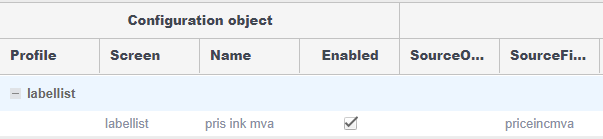
- **Screen**: `labellist`
- **Name**: `Price incl. VAT` (you can name it anything you want)
- **Enabled**: `On`
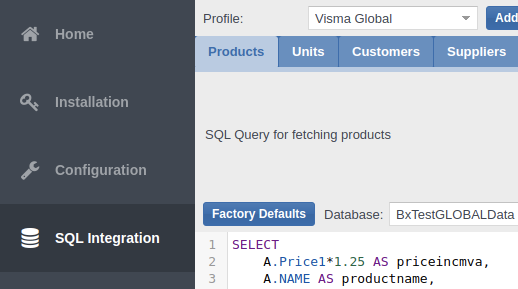
- **SourceField**: `priceincmva`
(retrieved from SQL Integration → Products → SQL column name)
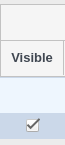
- **Visible**: `On`
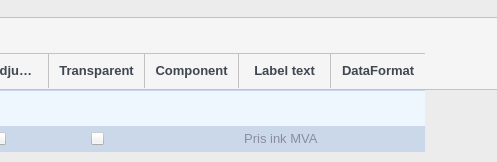
- **Component**: `numbercolumn` (column type for numeric filtering; defaults to text otherwise)
- **Label text**: `Price incl. VAT`
(field name displayed in Labels; scroll all the way to the right to find this setting)
With this setup, an additional column will appear in the **Labels** list, showing the "Price incl. VAT" alongside other fields such as "Price excluding VAT", if desired.
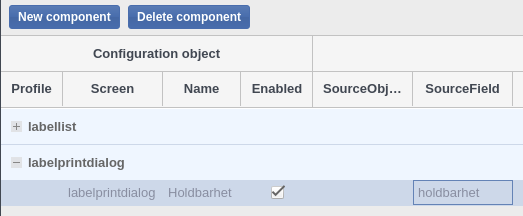
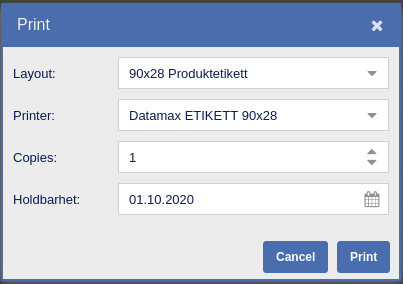
**BxWebManager - Labels - Adding extra fields to the Print Dialogue**
**Settings:**
- **Screen**: `labelprintdialogue`
- **Name**: `holdbarhet` (Shelf life)
- **Enabled**: `On`
- **SourceField**: `holdbarhet` (this can also come from a query when using a different "Component"; in this case, we use a static date field).
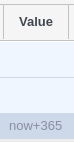
- **Value**: `now+365` (e.g., if the product's shelf life is 365 days from the print date, this value is auto-filled).
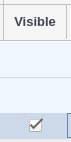
- **Visible**: `On`
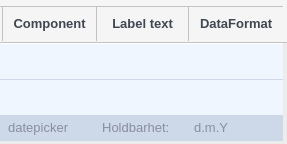
- **Component**: `datepicker`
- **Label text**: `holdbarhet`
- **Date format**: `d.m.Y` (to format the date as `01.01.2020` on the label).
**Alternative: Fully dynamic fields for Labels columns**
As an alternative, you can make all columns in the **Labels** module dynamic. However, this approach removes the ability to filter by specific data types such as dates or numbers. Instead, it automatically displays all columns from the **Products** query.
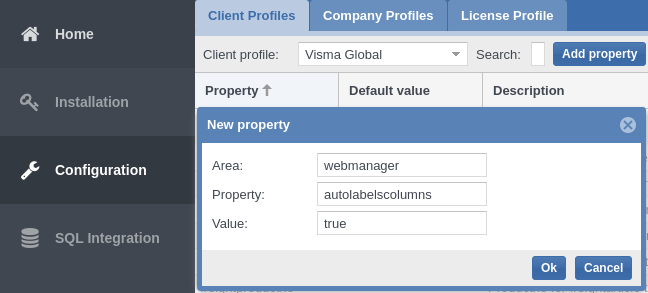
1. Open **BxAdmin** → **Configuration** → **Client Profile** → Click **Add Property**.
2. Enter the following values:
• **Area**: `webmanager`
• **Property**: `autolabelscolumns`
• **Value**: `true`
3. Click **OK** to save the configuration.
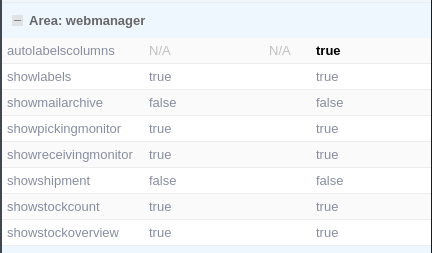
Once saved, this setting will appear under **Area: webmanager**, and all columns from the **Products** query will be dynamically displayed in the Labels list.
- [BxLogistics Installation](https://kb.bxsoftware.no/en/hjelp/bxlogistics-installation?hsLang=en#main-content)
- [BxEngine and BxSmartPrintPro](https://kb.bxsoftware.no/en/hjelp/bxlogistics-installation?hsLang=en#bxengine-and-bxsmartprintpro)
- [BxLogistics](https://kb.bxsoftware.no/en/hjelp/bxlogistics-installation?hsLang=en#bxlogistics)
- [ERP Integrations and setup](https://kb.bxsoftware.no/en/hjelp/erp-integrations-and-setup?hsLang=en#main-content)
- [Visma Business](https://kb.bxsoftware.no/en/hjelp/erp-integrations-and-setup?hsLang=en#visma-business)
- [VBNxt](https://kb.bxsoftware.no/en/hjelp/erp-integrations-and-setup?hsLang=en#vbnxt)
- [Visma Net](https://kb.bxsoftware.no/en/hjelp/erp-integrations-and-setup?hsLang=en#visma-net)
- [Xledger](https://kb.bxsoftware.no/en/hjelp/erp-integrations-and-setup?hsLang=en#xledger)
- [Transport integrations](https://kb.bxsoftware.no/en/hjelp/transport-integrations?hsLang=en#main-content)
- [AxiaFrakt](https://kb.bxsoftware.no/en/hjelp/transport-integrations?hsLang=en#axiafrakt)
- [Logistra Cargonizer](https://kb.bxsoftware.no/en/hjelp/transport-integrations?hsLang=en#logistra-cargonizer)
- [ERP delivery methods](https://kb.bxsoftware.no/en/hjelp/transport-integrations?hsLang=en#erp-delivery-methods)
- [nShift Shipment Server](https://kb.bxsoftware.no/en/hjelp/transport-integrations?hsLang=en#nshift-shipment-server)
- [nShift/Unifaun Online](https://kb.bxsoftware.no/en/hjelp/transport-integrations?hsLang=en#nshift-unifaun-online)
- [nShift/Consignor OnPrem](https://kb.bxsoftware.no/en/hjelp/transport-integrations?hsLang=en#nshift-consignor-onprem)
- [User guides BxMobile](https://kb.bxsoftware.no/en/hjelp/user-guides-bxmobile?hsLang=en#main-content)
- [General](https://kb.bxsoftware.no/en/hjelp/user-guides-bxmobile?hsLang=en#general)
- [Stock transfer](https://kb.bxsoftware.no/en/hjelp/user-guides-bxmobile?hsLang=en#stock-transfer)
- [Products](https://kb.bxsoftware.no/en/hjelp/user-guides-bxmobile?hsLang=en#products)
- [Stock count](https://kb.bxsoftware.no/en/hjelp/user-guides-bxmobile?hsLang=en#stock-count)
- [User Guides BxWebManager](https://kb.bxsoftware.no/en/hjelp/user-guides-bxwebmanager?hsLang=en#main-content)
- [General](https://kb.bxsoftware.no/en/hjelp/user-guides-bxwebmanager?hsLang=en#general)
- [Labels](https://kb.bxsoftware.no/en/hjelp/user-guides-bxwebmanager?hsLang=en#labels)
- [Technical Documentation](https://kb.bxsoftware.no/en/hjelp/technical-documentation?hsLang=en#main-content)
- [BxAdmin - Client UI](https://kb.bxsoftware.no/en/hjelp/technical-documentation?hsLang=en#bxadmin-client-ui)
- [BxSmartPrintPro](https://kb.bxsoftware.no/en/hjelp/technical-documentation?hsLang=en#bxsmartprintpro)
- [Picking - Freight booking](https://kb.bxsoftware.no/en/hjelp/technical-documentation?hsLang=en#picking-freight-booking)
- [Infrastructure](https://kb.bxsoftware.no/en/hjelp/technical-documentation?hsLang=en#infrastructure)
- [Visma Global specific](https://kb.bxsoftware.no/en/hjelp/technical-documentation?hsLang=en#visma-global-specific)
- [Visma Business specific](https://kb.bxsoftware.no/en/hjelp/technical-documentation?hsLang=en#visma-business-specific)
- [VismaNet specific](https://kb.bxsoftware.no/en/hjelp/technical-documentation?hsLang=en#vismanet-specific)
- [Stock count](https://kb.bxsoftware.no/en/hjelp/stock-count?hsLang=en#main-content)
- [Visma Net](https://kb.bxsoftware.no/en/hjelp/stock-count?hsLang=en#visma-net)
- [Logistics](https://kb.bxsoftware.no/en/hjelp/logistics?hsLang=en#main-content)
- [Location](https://kb.bxsoftware.no/en/hjelp/logistics?hsLang=en#location)
- [Troubleshooting](https://kb.bxsoftware.no/en/hjelp/troubleshooting?hsLang=en#main-content)
- [Freight](https://kb.bxsoftware.no/en/hjelp/troubleshooting?hsLang=en#freight)
- [Visma Net](https://kb.bxsoftware.no/en/hjelp/troubleshooting?hsLang=en#visma-net)
- [BxMobile](https://kb.bxsoftware.no/en/hjelp/troubleshooting?hsLang=en#bxmobile)
- [BxSmartPrintPro](https://kb.bxsoftware.no/en/hjelp/troubleshooting?hsLang=en#bxsmartprintpro)
- [Visma Business](https://kb.bxsoftware.no/en/hjelp/troubleshooting?hsLang=en#visma-business)
- [BxAdmin](https://kb.bxsoftware.no/en/hjelp/troubleshooting?hsLang=en#bxadmin)
- [BxAPI](https://kb.bxsoftware.no/en/hjelp/bxapi?hsLang=en)
- [Video archive](https://kb.bxsoftware.no/en/hjelp/video-archive?hsLang=en#main-content)
- [Sales](https://kb.bxsoftware.no/en/hjelp/video-archive?hsLang=en#sales)
- [Stock pick](https://kb.bxsoftware.no/en/hjelp/video-archive?hsLang=en#stock-pick)
- [Stock count](https://kb.bxsoftware.no/en/hjelp/video-archive?hsLang=en#stock-count)
- [General](https://kb.bxsoftware.no/en/hjelp/video-archive?hsLang=en#general)
- [BxWebManager](https://kb.bxsoftware.no/en/hjelp/video-archive?hsLang=en#bxwebmanager)
[](https://www.bxlogistics.no/)
Karihaugveien 89, Oslo, Norway
[mailto:support@bxsoftware.no](mailto:support@bxsoftware.no)
Copyright © 2025, BxSoftware AS