---
title: Bruke lokasjon fra Normalplassering i plukk/mottak
description: Visma Business kan hente lokasjon på flere måter, det er enkelt å la BxLogistics hente lokasjon fra normalplassering istedenfor ordrelinje
---
[Gå til innhold](https://kb.bxsoftware.no/hjelp/normalplassering-i-plukk-og-mottak#main-content)
- [Norsk – Norge](https://kb.bxsoftware.no/hjelp/normalplassering-i-plukk-og-mottak)
- [English](https://kb.bxsoftware.no/en/hjelp/bruke-lokasjon-fra-normalplassering-i-plukk/mottak)
Norsk – Norge
Vis undermeny for oversettelser
[](https://www.bxlogistics.no/)
- [Henvendelser](https://kb.bxsoftware.no/tickets)
- [Selvhjelp](https://kb.bxsoftware.no/hjelp)
- [Logg ut](https://kb.bxsoftware.no/_hcms/mem/logout)
Åpne hovednavigasjon
Lukk hovednavigasjon
- [Henvendelser](https://kb.bxsoftware.no/tickets)
- [Selvhjelp](https://kb.bxsoftware.no/hjelp)
- [Logg ut](https://kb.bxsoftware.no/_hcms/mem/logout)
- - [Norsk – Norge](https://kb.bxsoftware.no/hjelp/normalplassering-i-plukk-og-mottak)
- [English](https://kb.bxsoftware.no/en/hjelp/bruke-lokasjon-fra-normalplassering-i-plukk/mottak)
Norsk – Norge
Vis undermeny for oversettelser
Hvordan kan vi hjelpe deg?
- Det finnes ingen forslag fordi søkefeltet er tomt.
1. [Selvhjelp](https://kb.bxsoftware.no/hjelp?hsLang=no-no)
2. [Teknisk Dokumentasjon](https://kb.bxsoftware.no/hjelp/teknisk-dokumentasjon?hsLang=no-no)
3. [Visma Business spesifikt](https://kb.bxsoftware.no/hjelp/teknisk-dokumentasjon?hsLang=no-no#visma-business-spesifikt)
# Bruke lokasjon fra Normalplassering i plukk/mottak
## Visma Business kan hente lokasjon på flere måter, det er enkelt å la BxLogistics hente lokasjon fra normalplassering istedenfor ordrelinje
1. Logg inn i kundens **BxAdmin**
2. Trykk på **SQL Integration**
3. Velg **Picking**
4. Velg så **Pickinglist Lines**
5. Under **select**, finn "ol.loc location,". Kommenter vekk med to -- foran
6. Legg inn "bal.nrmloc location," under **select**
7. Legg inn "left join stcbal bal on bal.prodno = ol.prodno and stcno = ol.frstc" under **from**
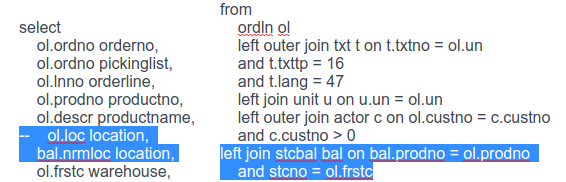
8. Trykk så **Save** og **Run Query** for å lagre og kjøre spørringen. Får du rett resultat og ingen feilmeldinger skal alt være i orden.
Har man flere avdelinger/lager bør det også legges på en "and bal.stcno = ol.frstc" (*left join stcbal bal on bal.prodno = ol.prodno and bal.stcno = ol.frstc*) for å låse ordrelinjer pr. lager slik at man ikke får mange duplikat-produkter.
- [BxLogistics Installasjon](https://kb.bxsoftware.no/hjelp/bxlogistics-installasjon?hsLang=no-no#main-content)
- [BxEngine og BxSmartPrintPro](https://kb.bxsoftware.no/hjelp/bxlogistics-installasjon?hsLang=no-no#bxengine-og-bxsmartprintpro)
- [BxLogistics](https://kb.bxsoftware.no/hjelp/bxlogistics-installasjon?hsLang=no-no#bxlogistics)
- [ERP Integrasjoner og oppsett](https://kb.bxsoftware.no/hjelp/erp-integrasjoner-og-oppsett?hsLang=no-no#main-content)
- [Visma Business](https://kb.bxsoftware.no/hjelp/erp-integrasjoner-og-oppsett?hsLang=no-no#visma-business)
- [Business NXT](https://kb.bxsoftware.no/hjelp/erp-integrasjoner-og-oppsett?hsLang=no-no#business-nxt)
- [Tripletex](https://kb.bxsoftware.no/hjelp/erp-integrasjoner-og-oppsett?hsLang=no-no#tripletex)
- [Visma Net](https://kb.bxsoftware.no/hjelp/erp-integrasjoner-og-oppsett?hsLang=no-no#visma-net)
- [Xledger](https://kb.bxsoftware.no/hjelp/erp-integrasjoner-og-oppsett?hsLang=no-no#xledger)
- [Rackbeat](https://kb.bxsoftware.no/hjelp/erp-integrasjoner-og-oppsett?hsLang=no-no#rackbeat)
- [Fraktintegrasjoner](https://kb.bxsoftware.no/hjelp/fraktintegrasjoner?hsLang=no-no#main-content)
- [AxiaFrakt](https://kb.bxsoftware.no/hjelp/fraktintegrasjoner?hsLang=no-no#axiafrakt)
- [Logistra Cargonizer](https://kb.bxsoftware.no/hjelp/fraktintegrasjoner?hsLang=no-no#logistra-cargonizer)
- [ERP leveringsmetoder](https://kb.bxsoftware.no/hjelp/fraktintegrasjoner?hsLang=no-no#erp-leveringsmetoder)
- [nShift Shipment Server](https://kb.bxsoftware.no/hjelp/fraktintegrasjoner?hsLang=no-no#nshift-shipment-server)
- [nShift/Unifaun Online](https://kb.bxsoftware.no/hjelp/fraktintegrasjoner?hsLang=no-no#nshift-unifaun-online)
- [nShift/Consignor OnPrem](https://kb.bxsoftware.no/hjelp/fraktintegrasjoner?hsLang=no-no#nshift-consignor-onprem)
- [Brukermanualer BxMobile](https://kb.bxsoftware.no/hjelp/brukermanualer-bxmobile?hsLang=no-no#main-content)
- [Generelt](https://kb.bxsoftware.no/hjelp/brukermanualer-bxmobile?hsLang=no-no#generelt)
- [Introduksjon](https://kb.bxsoftware.no/hjelp/brukermanualer-bxmobile?hsLang=no-no#introduksjon)
- [Salg](https://kb.bxsoftware.no/hjelp/brukermanualer-bxmobile?hsLang=no-no#salg)
- [Varetelling](https://kb.bxsoftware.no/hjelp/brukermanualer-bxmobile?hsLang=no-no#varetelling)
- [Vareplukk](https://kb.bxsoftware.no/hjelp/brukermanualer-bxmobile?hsLang=no-no#vareplukk)
- [Fraktbestilling](https://kb.bxsoftware.no/hjelp/brukermanualer-bxmobile?hsLang=no-no#fraktbestilling)
- [Varemottak](https://kb.bxsoftware.no/hjelp/brukermanualer-bxmobile?hsLang=no-no#varemottak)
- [Vareflytting](https://kb.bxsoftware.no/hjelp/brukermanualer-bxmobile?hsLang=no-no#vareflytting)
- [Lageroverføring](https://kb.bxsoftware.no/hjelp/brukermanualer-bxmobile?hsLang=no-no#lageroverf%C3%B8ring)
- [Etiketter](https://kb.bxsoftware.no/hjelp/brukermanualer-bxmobile?hsLang=no-no#etiketter)
- [Utlevering](https://kb.bxsoftware.no/hjelp/brukermanualer-bxmobile?hsLang=no-no#utlevering)
- [Varer](https://kb.bxsoftware.no/hjelp/brukermanualer-bxmobile?hsLang=no-no#varer)
- [Innkjøp](https://kb.bxsoftware.no/hjelp/brukermanualer-bxmobile?hsLang=no-no#innkj%C3%B8p)
- [Brukermanualer BxWebManager](https://kb.bxsoftware.no/hjelp/brukermanualer-bxwebmanager?hsLang=no-no#main-content)
- [General](https://kb.bxsoftware.no/hjelp/brukermanualer-bxwebmanager?hsLang=no-no#general)
- [Labels](https://kb.bxsoftware.no/hjelp/brukermanualer-bxwebmanager?hsLang=no-no#labels)
- [Teknisk Dokumentasjon](https://kb.bxsoftware.no/hjelp/teknisk-dokumentasjon?hsLang=no-no#main-content)
- [BxAdmin - Client UI](https://kb.bxsoftware.no/hjelp/teknisk-dokumentasjon?hsLang=no-no#bxadmin-client-ui)
- [BxSmartPrintPro](https://kb.bxsoftware.no/hjelp/teknisk-dokumentasjon?hsLang=no-no#bxsmartprintpro)
- [Plukk - Fraktbestilling](https://kb.bxsoftware.no/hjelp/teknisk-dokumentasjon?hsLang=no-no#plukk-fraktbestilling)
- [BxMobile](https://kb.bxsoftware.no/hjelp/teknisk-dokumentasjon?hsLang=no-no#bxmobile)
- [Infrastruktur](https://kb.bxsoftware.no/hjelp/teknisk-dokumentasjon?hsLang=no-no#infrastruktur)
- [Visma Global spesifikt](https://kb.bxsoftware.no/hjelp/teknisk-dokumentasjon?hsLang=no-no#visma-global-spesifikt)
- [Visma Business spesifikt](https://kb.bxsoftware.no/hjelp/teknisk-dokumentasjon?hsLang=no-no#visma-business-spesifikt)
- [VismaNet spesifikt](https://kb.bxsoftware.no/hjelp/teknisk-dokumentasjon?hsLang=no-no#vismanet-spesifikt)
- [BusinessNxt spesifikt](https://kb.bxsoftware.no/hjelp/teknisk-dokumentasjon?hsLang=no-no#businessnxt-spesifikt)
- [Varetelling](https://kb.bxsoftware.no/hjelp/varetelling?hsLang=no-no#main-content)
- [Tellemetoder](https://kb.bxsoftware.no/hjelp/varetelling?hsLang=no-no#tellemetoder)
- [Visma Net](https://kb.bxsoftware.no/hjelp/varetelling?hsLang=no-no#visma-net)
- [Business NXT](https://kb.bxsoftware.no/hjelp/varetelling?hsLang=no-no#business-nxt)
- [Tripletex](https://kb.bxsoftware.no/hjelp/varetelling?hsLang=no-no#tripletex)
- [Visma Business](https://kb.bxsoftware.no/hjelp/varetelling?hsLang=no-no#visma-business)
- [Visma Global](https://kb.bxsoftware.no/hjelp/varetelling?hsLang=no-no#visma-global)
- [Generelt](https://kb.bxsoftware.no/hjelp/varetelling?hsLang=no-no#generelt)
- [Logistikk](https://kb.bxsoftware.no/hjelp/logistikk?hsLang=no-no#main-content)
- [Lokasjon](https://kb.bxsoftware.no/hjelp/logistikk?hsLang=no-no#lokasjon)
- [Feilsøking](https://kb.bxsoftware.no/hjelp/feils%C3%B8king?hsLang=no-no#main-content)
- [Frakt](https://kb.bxsoftware.no/hjelp/feils%C3%B8king?hsLang=no-no#frakt)
- [Visma Net](https://kb.bxsoftware.no/hjelp/feils%C3%B8king?hsLang=no-no#visma-net)
- [BxMobile](https://kb.bxsoftware.no/hjelp/feils%C3%B8king?hsLang=no-no#bxmobile)
- [BxSmartPrintPro](https://kb.bxsoftware.no/hjelp/feils%C3%B8king?hsLang=no-no#bxsmartprintpro)
- [Visma Business](https://kb.bxsoftware.no/hjelp/feils%C3%B8king?hsLang=no-no#visma-business)
- [BxAdmin](https://kb.bxsoftware.no/hjelp/feils%C3%B8king?hsLang=no-no#bxadmin)
- [BxAPI](https://kb.bxsoftware.no/hjelp/bxapi?hsLang=no-no)
- [Videoarkiv](https://kb.bxsoftware.no/hjelp/videoarkiv?hsLang=no-no#main-content)
- [Salg](https://kb.bxsoftware.no/hjelp/videoarkiv?hsLang=no-no#salg)
- [Plukk](https://kb.bxsoftware.no/hjelp/videoarkiv?hsLang=no-no#plukk)
- [Lagertelling](https://kb.bxsoftware.no/hjelp/videoarkiv?hsLang=no-no#lagertelling)
- [Generelt](https://kb.bxsoftware.no/hjelp/videoarkiv?hsLang=no-no#generelt)
- [BxWebManager](https://kb.bxsoftware.no/hjelp/videoarkiv?hsLang=no-no#bxwebmanager)
[](https://www.bxlogistics.no/)
Karihaugveien 89, Oslo, Norway
[mailto:support@bxsoftware.no](mailto:support@bxsoftware.no)
Copyright © 2025, BxSoftware AS