---
title: Reports in BxMobile (handheld terminal) and BxWebManager
description: A dedicated reporting module is now available in BxMobile and BxWebManager. These reports are based on SQL queries configured in BxAdmin.
---
[Skip to content](https://kb.bxsoftware.no/en/hjelp/reports-in-bxmobile-handheld-terminal-and-bxwebmanager#main-content)
- [English](https://kb.bxsoftware.no/en/hjelp/reports-in-bxmobile-handheld-terminal-and-bxwebmanager)
- [Norsk – Norge](https://kb.bxsoftware.no/hjelp/rapporter-i-bxmobile-håndterminal-og-bxwebmanager)
English
Show submenu for translations
[](https://www.bxlogistics.no/)
- [Henvendelser](https://kb.bxsoftware.no/tickets)
- [Selvhjelp](https://kb.bxsoftware.no/hjelp)
- [Logg ut](https://kb.bxsoftware.no/_hcms/mem/logout)
Open main navigation
Close main navigation
- [Henvendelser](https://kb.bxsoftware.no/tickets)
- [Selvhjelp](https://kb.bxsoftware.no/hjelp)
- [Logg ut](https://kb.bxsoftware.no/_hcms/mem/logout)
- - [English](https://kb.bxsoftware.no/en/hjelp/reports-in-bxmobile-handheld-terminal-and-bxwebmanager)
- [Norsk – Norge](https://kb.bxsoftware.no/hjelp/rapporter-i-bxmobile-håndterminal-og-bxwebmanager)
English
Show submenu for translations
How can we help you?
- There are no suggestions because the search field is empty.
1. [Selvhjelp](https://kb.bxsoftware.no/en/hjelp?hsLang=en)
2. [Technical Documentation](https://kb.bxsoftware.no/en/hjelp/technical-documentation?hsLang=en)
# Reports in BxMobile (handheld terminal) and BxWebManager
## A dedicated reporting module is now available in BxMobile and BxWebManager. These reports are based on SQL queries configured in BxAdmin.
### Setup
1. #### Start by logging in to BxAdmin
2. #### Activate the module
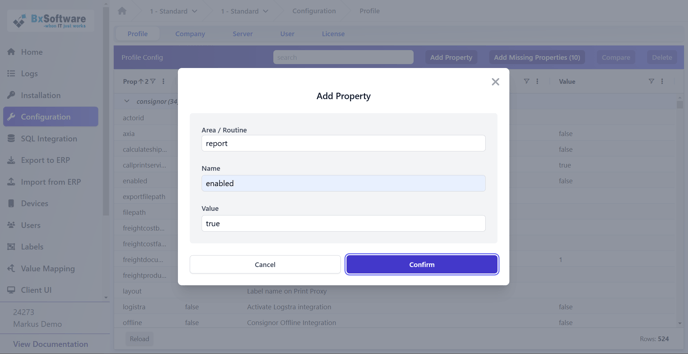
1\. Go to the **Configuration menu**
2\. Select "**Add Property**"
3\. Enter the following values:
• **Area/Routine**: `report`
• **Name**: `enabled`
• **Value**: `true`
4\. Click "**Confirm**"
#### 
3. #### Create SQL Queries
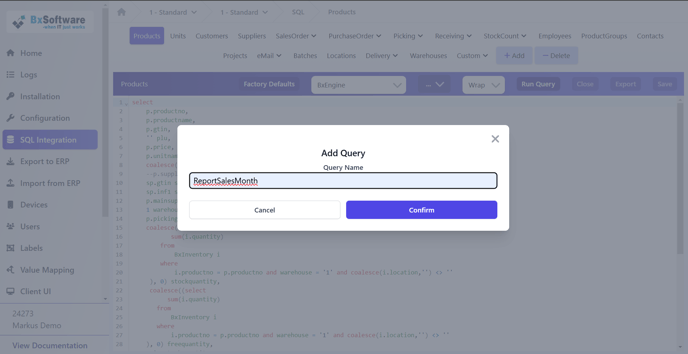
1\. Go to the **SQL Integration** menu
2\. Click "**+Add**"
3\. Name the query. Start with `report` for easier identification
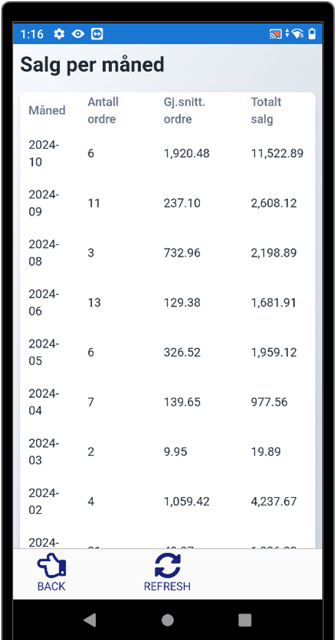
4\. Write you desired query, e.g., monthly sales statistics on Visma Business orders
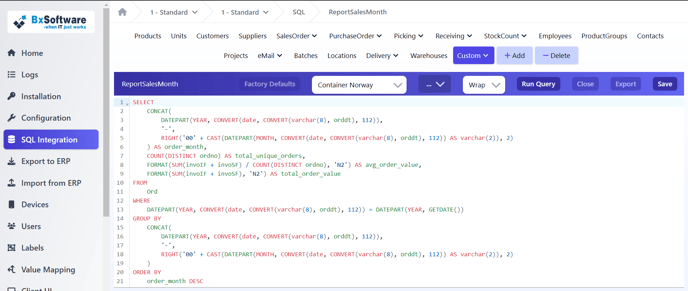
5\. Click "Run Query" to test it
6\. Click "Save" when finished
4. #### Create Reports
Go to the Reports menu
Fill in the fields:
• **Report Id**: A unique identifier for the report
• **Report title**: The title shown in BxMobile
• **Query Name**: Name of the SQL query
• **Description**: (Optional) Additional description displayed on the report
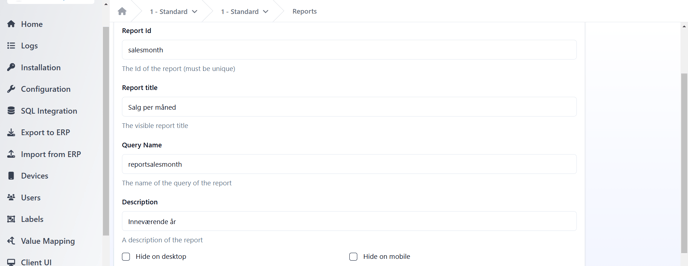
Add the required fields (by default, all columns from the query are displayed). Fields can also be used to set **custom column titles**.
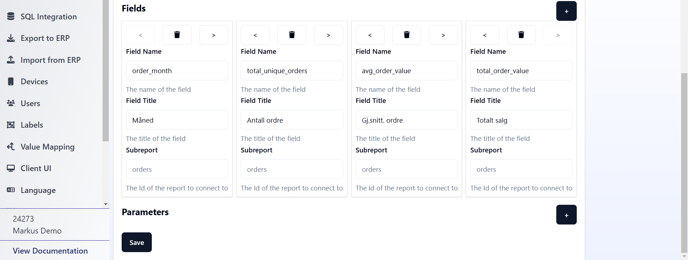
Add any **report parameters** (e.g., year, order number, etc), and then click "**Save**".
#### Final Steps
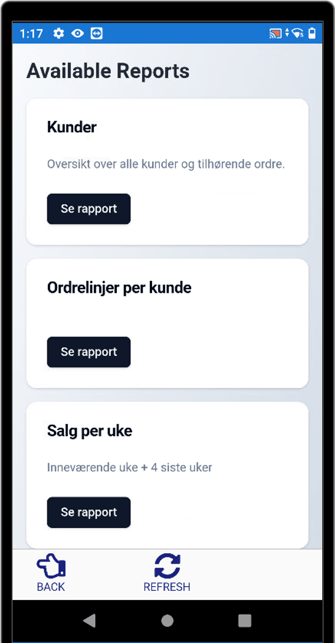
- The report is now set up and will be visible in **BxMobile**.
- Remember to **download settings** on the handheld terminal for the report to appear.
#### Cloud vs. OnPrem Integration
- **OnPrem Integration**: Data is fetched in **real-time** when running the report.
- **Cloud Integration**: Data must be downloaded **before** running reports.
- [BxLogistics Installation](https://kb.bxsoftware.no/en/hjelp/bxlogistics-installation?hsLang=en#main-content)
- [BxEngine and BxSmartPrintPro](https://kb.bxsoftware.no/en/hjelp/bxlogistics-installation?hsLang=en#bxengine-and-bxsmartprintpro)
- [BxLogistics](https://kb.bxsoftware.no/en/hjelp/bxlogistics-installation?hsLang=en#bxlogistics)
- [ERP Integrations and setup](https://kb.bxsoftware.no/en/hjelp/erp-integrations-and-setup?hsLang=en#main-content)
- [Visma Business](https://kb.bxsoftware.no/en/hjelp/erp-integrations-and-setup?hsLang=en#visma-business)
- [VBNxt](https://kb.bxsoftware.no/en/hjelp/erp-integrations-and-setup?hsLang=en#vbnxt)
- [Visma Net](https://kb.bxsoftware.no/en/hjelp/erp-integrations-and-setup?hsLang=en#visma-net)
- [Xledger](https://kb.bxsoftware.no/en/hjelp/erp-integrations-and-setup?hsLang=en#xledger)
- [Transport integrations](https://kb.bxsoftware.no/en/hjelp/transport-integrations?hsLang=en#main-content)
- [AxiaFrakt](https://kb.bxsoftware.no/en/hjelp/transport-integrations?hsLang=en#axiafrakt)
- [Logistra Cargonizer](https://kb.bxsoftware.no/en/hjelp/transport-integrations?hsLang=en#logistra-cargonizer)
- [ERP delivery methods](https://kb.bxsoftware.no/en/hjelp/transport-integrations?hsLang=en#erp-delivery-methods)
- [nShift Shipment Server](https://kb.bxsoftware.no/en/hjelp/transport-integrations?hsLang=en#nshift-shipment-server)
- [nShift/Unifaun Online](https://kb.bxsoftware.no/en/hjelp/transport-integrations?hsLang=en#nshift-unifaun-online)
- [nShift/Consignor OnPrem](https://kb.bxsoftware.no/en/hjelp/transport-integrations?hsLang=en#nshift-consignor-onprem)
- [User guides BxMobile](https://kb.bxsoftware.no/en/hjelp/user-guides-bxmobile?hsLang=en#main-content)
- [General](https://kb.bxsoftware.no/en/hjelp/user-guides-bxmobile?hsLang=en#general)
- [Stock transfer](https://kb.bxsoftware.no/en/hjelp/user-guides-bxmobile?hsLang=en#stock-transfer)
- [Products](https://kb.bxsoftware.no/en/hjelp/user-guides-bxmobile?hsLang=en#products)
- [Stock count](https://kb.bxsoftware.no/en/hjelp/user-guides-bxmobile?hsLang=en#stock-count)
- [User Guides BxWebManager](https://kb.bxsoftware.no/en/hjelp/user-guides-bxwebmanager?hsLang=en#main-content)
- [General](https://kb.bxsoftware.no/en/hjelp/user-guides-bxwebmanager?hsLang=en#general)
- [Labels](https://kb.bxsoftware.no/en/hjelp/user-guides-bxwebmanager?hsLang=en#labels)
- [Technical Documentation](https://kb.bxsoftware.no/en/hjelp/technical-documentation?hsLang=en#main-content)
- [BxAdmin - Client UI](https://kb.bxsoftware.no/en/hjelp/technical-documentation?hsLang=en#bxadmin-client-ui)
- [BxSmartPrintPro](https://kb.bxsoftware.no/en/hjelp/technical-documentation?hsLang=en#bxsmartprintpro)
- [Picking - Freight booking](https://kb.bxsoftware.no/en/hjelp/technical-documentation?hsLang=en#picking-freight-booking)
- [Infrastructure](https://kb.bxsoftware.no/en/hjelp/technical-documentation?hsLang=en#infrastructure)
- [Visma Global specific](https://kb.bxsoftware.no/en/hjelp/technical-documentation?hsLang=en#visma-global-specific)
- [Visma Business specific](https://kb.bxsoftware.no/en/hjelp/technical-documentation?hsLang=en#visma-business-specific)
- [VismaNet specific](https://kb.bxsoftware.no/en/hjelp/technical-documentation?hsLang=en#vismanet-specific)
- [Stock count](https://kb.bxsoftware.no/en/hjelp/stock-count?hsLang=en#main-content)
- [Visma Net](https://kb.bxsoftware.no/en/hjelp/stock-count?hsLang=en#visma-net)
- [Logistics](https://kb.bxsoftware.no/en/hjelp/logistics?hsLang=en#main-content)
- [Location](https://kb.bxsoftware.no/en/hjelp/logistics?hsLang=en#location)
- [Troubleshooting](https://kb.bxsoftware.no/en/hjelp/troubleshooting?hsLang=en#main-content)
- [Freight](https://kb.bxsoftware.no/en/hjelp/troubleshooting?hsLang=en#freight)
- [Visma Net](https://kb.bxsoftware.no/en/hjelp/troubleshooting?hsLang=en#visma-net)
- [BxMobile](https://kb.bxsoftware.no/en/hjelp/troubleshooting?hsLang=en#bxmobile)
- [BxSmartPrintPro](https://kb.bxsoftware.no/en/hjelp/troubleshooting?hsLang=en#bxsmartprintpro)
- [Visma Business](https://kb.bxsoftware.no/en/hjelp/troubleshooting?hsLang=en#visma-business)
- [BxAdmin](https://kb.bxsoftware.no/en/hjelp/troubleshooting?hsLang=en#bxadmin)
- [BxAPI](https://kb.bxsoftware.no/en/hjelp/bxapi?hsLang=en)
- [Video archive](https://kb.bxsoftware.no/en/hjelp/video-archive?hsLang=en#main-content)
- [Sales](https://kb.bxsoftware.no/en/hjelp/video-archive?hsLang=en#sales)
- [Stock pick](https://kb.bxsoftware.no/en/hjelp/video-archive?hsLang=en#stock-pick)
- [Stock count](https://kb.bxsoftware.no/en/hjelp/video-archive?hsLang=en#stock-count)
- [General](https://kb.bxsoftware.no/en/hjelp/video-archive?hsLang=en#general)
- [BxWebManager](https://kb.bxsoftware.no/en/hjelp/video-archive?hsLang=en#bxwebmanager)
[](https://www.bxlogistics.no/)
Karihaugveien 89, Oslo, Norway
[mailto:support@bxsoftware.no](mailto:support@bxsoftware.no)
Copyright © 2025, BxSoftware AS