---
title: Unifaun Online / nShift Delivery - Additional services
description: Setup and configuration of Additional Services / Add-ons for Unifaun Online / nShift Delivery
---
[Gå til innhold](https://kb.bxsoftware.no/hjelp/unifaun-online-/-nshift-delivery-additional-services#main-content)
Norsk – Norge
Vis undermeny for oversettelser
[](https://www.bxlogistics.no/)
- [Henvendelser](https://kb.bxsoftware.no/tickets)
- [Selvhjelp](https://kb.bxsoftware.no/hjelp)
- [Logg ut](https://kb.bxsoftware.no/_hcms/mem/logout)
Åpne hovednavigasjon
Lukk hovednavigasjon
- [Henvendelser](https://kb.bxsoftware.no/tickets)
- [Selvhjelp](https://kb.bxsoftware.no/hjelp)
- [Logg ut](https://kb.bxsoftware.no/_hcms/mem/logout)
- Norsk – Norge
Vis undermeny for oversettelser
Hvordan kan vi hjelpe deg?
- Det finnes ingen forslag fordi søkefeltet er tomt.
1. [Selvhjelp](https://kb.bxsoftware.no/hjelp?hsLang=no-no)
2. [Fraktintegrasjoner](https://kb.bxsoftware.no/hjelp/fraktintegrasjoner?hsLang=no-no)
3. [nShift/Unifaun Online](https://kb.bxsoftware.no/hjelp/fraktintegrasjoner?hsLang=no-no#nshift-unifaun-online)
# Unifaun Online / nShift Delivery - Additional services
## Setup and configuration of Additional Services / Add-ons
Additional services (add-ons) must be configured manually as JSON objects for each service. Unfortunately, Unifaun API does not currently support importing these directly, so the information must first be retrieved from inside Unifaun.
#### Step 1: Retrieve Codes from Unifaun
To configure an add-on, you first need to identify the correct Service ID and any required value parameters.
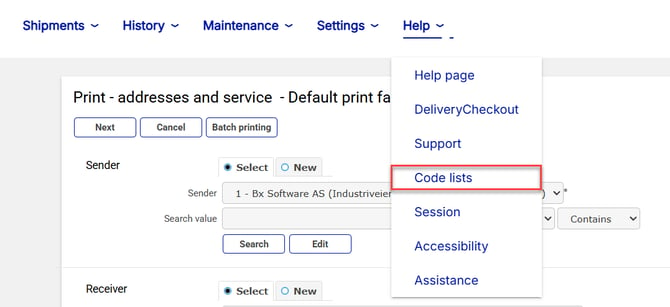
1. Log in to Unifaun and navigate to **Help** -\> **Code Lists**.
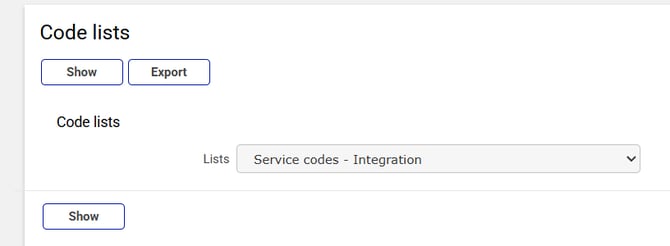
2. Select the list **Service codes - Integration**.
3. Locate the relevant Carrier and Freight Product (e.g., PostNord Service Point, code **P19**).
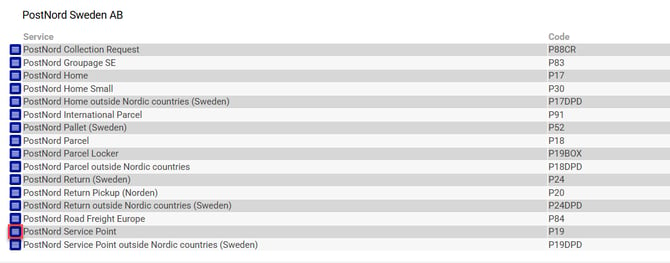
4. Click the small "View" button next to the Service open the Service menu
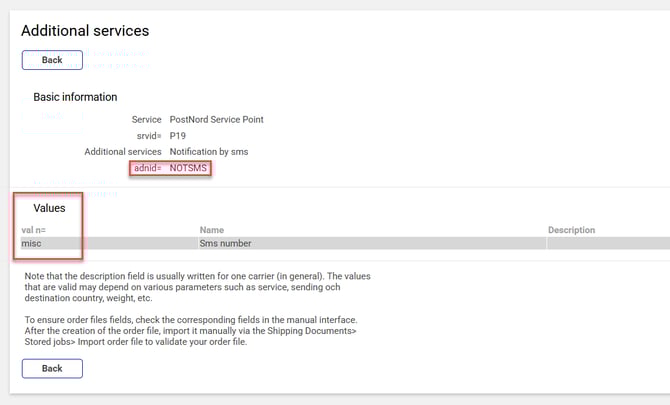
5. Click further to view Additional service information for the additional service you want to add (e.g., NOTSMS for Notification by sms).
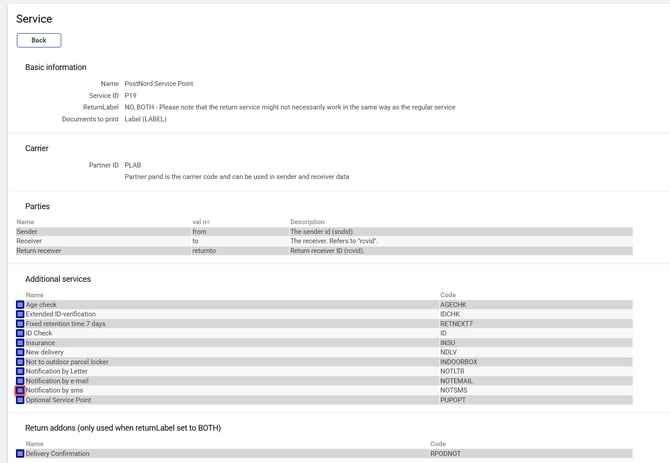
6. Note the ID for the additional service as well as any name of Values needed
#### **Step 2: Configure in BxAdmin** Assuming DeliveryMethods is already set up under **Data** -\> **Delivery Methods**:

1. Go to the **Delivery Services** tab.
2. Ensure the Carrier and Product match the delivery method.
3. Add the additional services (e.g., Notification by SMS) and build the JSON object. You can use any available information field, but in this example, we utilize the default Service field.

The JSON object must include the add-on ID found in the Unifaun Code List and any required values.
Example syntax:
{"id": "NOTSMS", "misc": "#delmobile#"}
Variables surrounded by # will be replaced by values when sending. Set variables corresponding to the information that needs to be replaced
4. Configure the Delivery Services SQL query to map the the service column (which now contains the JSON object) to the externalserviceid column. Ensure that the deliverymethod value corresponds to the main Delivery Methods query.
Below is an example where "Notification by sms" and "Notification by e-mail" are configured as optional services for PostNord Service Point. The SQL query extracts the JSON from the service column and aliases it as externalserviceid. with mobile phone and e-mail to be replaced by delmobile and delmail from the order.
SQL:
```
select d.deliverymethod, d.deliverymethod deliverymethodname, s.id service, s.servicename, s.service externalserviceidfrom system.DeliveryService s left join system.DeliveryMethod d on d.carrier = s.carrier and d.product = s.product where coalesce(d.deliverymethod,'') <> ''order by deliverymethod
```
Results:

5. Set showdeliveryservices to true to enable visibility on handheld terminals. It is also recommended to enable downloaddeliveryservices to ensure stability and offline support
- [BxLogistics Installasjon](https://kb.bxsoftware.no/hjelp/bxlogistics-installasjon?hsLang=no-no#main-content)
- [BxEngine og BxSmartPrintPro](https://kb.bxsoftware.no/hjelp/bxlogistics-installasjon?hsLang=no-no#bxengine-og-bxsmartprintpro)
- [BxLogistics](https://kb.bxsoftware.no/hjelp/bxlogistics-installasjon?hsLang=no-no#bxlogistics)
- [ERP Integrasjoner og oppsett](https://kb.bxsoftware.no/hjelp/erp-integrasjoner-og-oppsett?hsLang=no-no#main-content)
- [Visma Business](https://kb.bxsoftware.no/hjelp/erp-integrasjoner-og-oppsett?hsLang=no-no#visma-business)
- [Business NXT](https://kb.bxsoftware.no/hjelp/erp-integrasjoner-og-oppsett?hsLang=no-no#business-nxt)
- [Tripletex](https://kb.bxsoftware.no/hjelp/erp-integrasjoner-og-oppsett?hsLang=no-no#tripletex)
- [Visma Net](https://kb.bxsoftware.no/hjelp/erp-integrasjoner-og-oppsett?hsLang=no-no#visma-net)
- [Xledger](https://kb.bxsoftware.no/hjelp/erp-integrasjoner-og-oppsett?hsLang=no-no#xledger)
- [Rackbeat](https://kb.bxsoftware.no/hjelp/erp-integrasjoner-og-oppsett?hsLang=no-no#rackbeat)
- [Fraktintegrasjoner](https://kb.bxsoftware.no/hjelp/fraktintegrasjoner?hsLang=no-no#main-content)
- [AxiaFrakt](https://kb.bxsoftware.no/hjelp/fraktintegrasjoner?hsLang=no-no#axiafrakt)
- [Logistra Cargonizer](https://kb.bxsoftware.no/hjelp/fraktintegrasjoner?hsLang=no-no#logistra-cargonizer)
- [ERP leveringsmetoder](https://kb.bxsoftware.no/hjelp/fraktintegrasjoner?hsLang=no-no#erp-leveringsmetoder)
- [nShift Shipment Server](https://kb.bxsoftware.no/hjelp/fraktintegrasjoner?hsLang=no-no#nshift-shipment-server)
- [nShift/Unifaun Online](https://kb.bxsoftware.no/hjelp/fraktintegrasjoner?hsLang=no-no#nshift-unifaun-online)
- [nShift/Consignor OnPrem](https://kb.bxsoftware.no/hjelp/fraktintegrasjoner?hsLang=no-no#nshift-consignor-onprem)
- [Brukermanualer BxMobile](https://kb.bxsoftware.no/hjelp/brukermanualer-bxmobile?hsLang=no-no#main-content)
- [Generelt](https://kb.bxsoftware.no/hjelp/brukermanualer-bxmobile?hsLang=no-no#generelt)
- [Introduksjon](https://kb.bxsoftware.no/hjelp/brukermanualer-bxmobile?hsLang=no-no#introduksjon)
- [Salg](https://kb.bxsoftware.no/hjelp/brukermanualer-bxmobile?hsLang=no-no#salg)
- [Varetelling](https://kb.bxsoftware.no/hjelp/brukermanualer-bxmobile?hsLang=no-no#varetelling)
- [Vareplukk](https://kb.bxsoftware.no/hjelp/brukermanualer-bxmobile?hsLang=no-no#vareplukk)
- [Fraktbestilling](https://kb.bxsoftware.no/hjelp/brukermanualer-bxmobile?hsLang=no-no#fraktbestilling)
- [Varemottak](https://kb.bxsoftware.no/hjelp/brukermanualer-bxmobile?hsLang=no-no#varemottak)
- [Vareflytting](https://kb.bxsoftware.no/hjelp/brukermanualer-bxmobile?hsLang=no-no#vareflytting)
- [Lageroverføring](https://kb.bxsoftware.no/hjelp/brukermanualer-bxmobile?hsLang=no-no#lageroverf%C3%B8ring)
- [Etiketter](https://kb.bxsoftware.no/hjelp/brukermanualer-bxmobile?hsLang=no-no#etiketter)
- [Utlevering](https://kb.bxsoftware.no/hjelp/brukermanualer-bxmobile?hsLang=no-no#utlevering)
- [Varer](https://kb.bxsoftware.no/hjelp/brukermanualer-bxmobile?hsLang=no-no#varer)
- [Innkjøp](https://kb.bxsoftware.no/hjelp/brukermanualer-bxmobile?hsLang=no-no#innkj%C3%B8p)
- [Brukermanualer BxWebManager](https://kb.bxsoftware.no/hjelp/brukermanualer-bxwebmanager?hsLang=no-no#main-content)
- [General](https://kb.bxsoftware.no/hjelp/brukermanualer-bxwebmanager?hsLang=no-no#general)
- [Labels](https://kb.bxsoftware.no/hjelp/brukermanualer-bxwebmanager?hsLang=no-no#labels)
- [Teknisk Dokumentasjon](https://kb.bxsoftware.no/hjelp/teknisk-dokumentasjon?hsLang=no-no#main-content)
- [BxAdmin - Client UI](https://kb.bxsoftware.no/hjelp/teknisk-dokumentasjon?hsLang=no-no#bxadmin-client-ui)
- [BxSmartPrintPro](https://kb.bxsoftware.no/hjelp/teknisk-dokumentasjon?hsLang=no-no#bxsmartprintpro)
- [Plukk - Fraktbestilling](https://kb.bxsoftware.no/hjelp/teknisk-dokumentasjon?hsLang=no-no#plukk-fraktbestilling)
- [BxMobile](https://kb.bxsoftware.no/hjelp/teknisk-dokumentasjon?hsLang=no-no#bxmobile)
- [Infrastruktur](https://kb.bxsoftware.no/hjelp/teknisk-dokumentasjon?hsLang=no-no#infrastruktur)
- [Visma Global spesifikt](https://kb.bxsoftware.no/hjelp/teknisk-dokumentasjon?hsLang=no-no#visma-global-spesifikt)
- [Visma Business spesifikt](https://kb.bxsoftware.no/hjelp/teknisk-dokumentasjon?hsLang=no-no#visma-business-spesifikt)
- [VismaNet spesifikt](https://kb.bxsoftware.no/hjelp/teknisk-dokumentasjon?hsLang=no-no#vismanet-spesifikt)
- [BusinessNxt spesifikt](https://kb.bxsoftware.no/hjelp/teknisk-dokumentasjon?hsLang=no-no#businessnxt-spesifikt)
- [Varetelling](https://kb.bxsoftware.no/hjelp/varetelling?hsLang=no-no#main-content)
- [Tellemetoder](https://kb.bxsoftware.no/hjelp/varetelling?hsLang=no-no#tellemetoder)
- [Visma Net](https://kb.bxsoftware.no/hjelp/varetelling?hsLang=no-no#visma-net)
- [Business NXT](https://kb.bxsoftware.no/hjelp/varetelling?hsLang=no-no#business-nxt)
- [Tripletex](https://kb.bxsoftware.no/hjelp/varetelling?hsLang=no-no#tripletex)
- [Visma Business](https://kb.bxsoftware.no/hjelp/varetelling?hsLang=no-no#visma-business)
- [Visma Global](https://kb.bxsoftware.no/hjelp/varetelling?hsLang=no-no#visma-global)
- [Generelt](https://kb.bxsoftware.no/hjelp/varetelling?hsLang=no-no#generelt)
- [Logistikk](https://kb.bxsoftware.no/hjelp/logistikk?hsLang=no-no#main-content)
- [Lokasjon](https://kb.bxsoftware.no/hjelp/logistikk?hsLang=no-no#lokasjon)
- [Feilsøking](https://kb.bxsoftware.no/hjelp/feils%C3%B8king?hsLang=no-no#main-content)
- [Frakt](https://kb.bxsoftware.no/hjelp/feils%C3%B8king?hsLang=no-no#frakt)
- [Visma Net](https://kb.bxsoftware.no/hjelp/feils%C3%B8king?hsLang=no-no#visma-net)
- [BxMobile](https://kb.bxsoftware.no/hjelp/feils%C3%B8king?hsLang=no-no#bxmobile)
- [BxSmartPrintPro](https://kb.bxsoftware.no/hjelp/feils%C3%B8king?hsLang=no-no#bxsmartprintpro)
- [Visma Business](https://kb.bxsoftware.no/hjelp/feils%C3%B8king?hsLang=no-no#visma-business)
- [BxAdmin](https://kb.bxsoftware.no/hjelp/feils%C3%B8king?hsLang=no-no#bxadmin)
- [BxAPI](https://kb.bxsoftware.no/hjelp/bxapi?hsLang=no-no)
- [Videoarkiv](https://kb.bxsoftware.no/hjelp/videoarkiv?hsLang=no-no#main-content)
- [Salg](https://kb.bxsoftware.no/hjelp/videoarkiv?hsLang=no-no#salg)
- [Plukk](https://kb.bxsoftware.no/hjelp/videoarkiv?hsLang=no-no#plukk)
- [Lagertelling](https://kb.bxsoftware.no/hjelp/videoarkiv?hsLang=no-no#lagertelling)
- [Generelt](https://kb.bxsoftware.no/hjelp/videoarkiv?hsLang=no-no#generelt)
- [BxWebManager](https://kb.bxsoftware.no/hjelp/videoarkiv?hsLang=no-no#bxwebmanager)
[](https://www.bxlogistics.no/)
Karihaugveien 89, Oslo, Norway
[mailto:support@bxsoftware.no](mailto:support@bxsoftware.no)
Copyright © 2025, BxSoftware AS