---
title: Salg - utvidet søk
description: Utvidet søk for salgsmodul.
---
[Gå til innhold](https://kb.bxsoftware.no/hjelp/avansert-sok#main-content)
Norsk – Norge
Vis undermeny for oversettelser
[](https://www.bxlogistics.no/)
- [Henvendelser](https://kb.bxsoftware.no/tickets)
- [Selvhjelp](https://kb.bxsoftware.no/hjelp)
- [Logg ut](https://kb.bxsoftware.no/_hcms/mem/logout)
Åpne hovednavigasjon
Lukk hovednavigasjon
- [Henvendelser](https://kb.bxsoftware.no/tickets)
- [Selvhjelp](https://kb.bxsoftware.no/hjelp)
- [Logg ut](https://kb.bxsoftware.no/_hcms/mem/logout)
- Norsk – Norge
Vis undermeny for oversettelser
Hvordan kan vi hjelpe deg?
- Det finnes ingen forslag fordi søkefeltet er tomt.
1. [Selvhjelp](https://kb.bxsoftware.no/hjelp?hsLang=no-no)
2. [Brukermanualer BxMobile](https://kb.bxsoftware.no/hjelp/brukermanualer-bxmobile?hsLang=no-no)
3. [Salg](https://kb.bxsoftware.no/hjelp/brukermanualer-bxmobile?hsLang=no-no#salg)
# Salg - utvidet søk
## Utvidet artikkelsøk ved bruk av salgsmodulen
Det er nå mulig å sette opp et utvidet artikkelsøk ved bruk av salgsmodulen. I det nye søket vil det vises informasjon om lagerstatus og pris, og antall kan velges uten å måtte gå tilbake til salgsordren.
Begynn med å åpne et nytt salg:
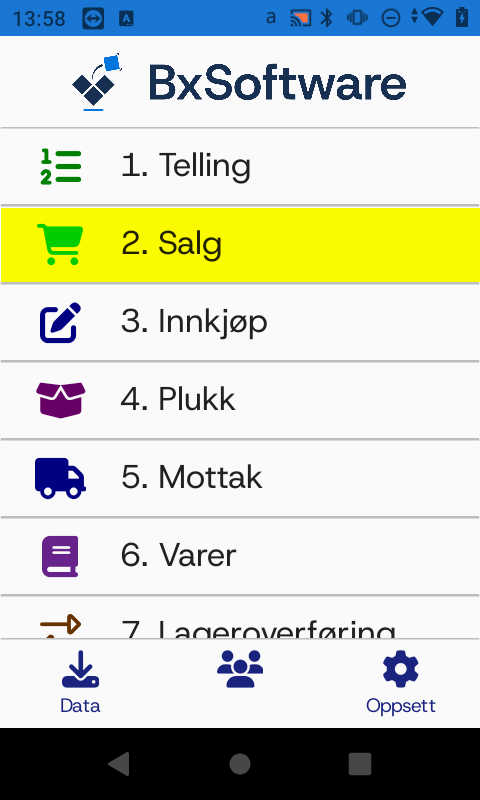
Start nytt salg med +, velg kunde og trykk fortsett
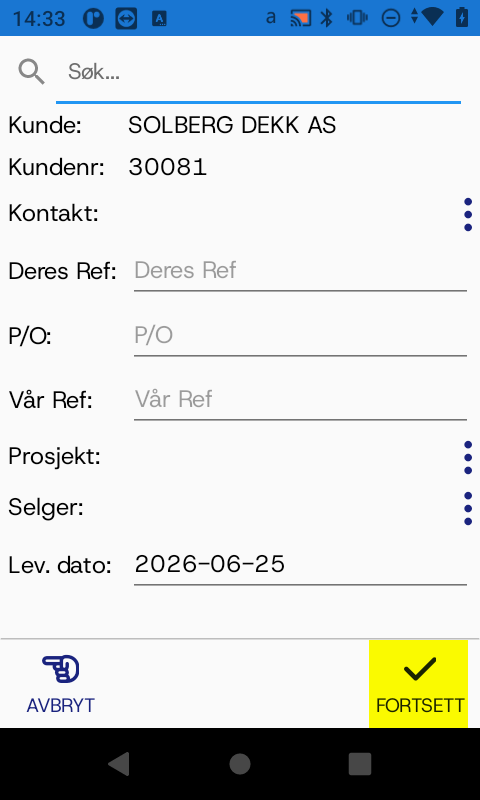
Begynn å skrive inn tekst fra varen du ser etter. Søket starter ett sekund etter inntasting.
Når du finner rett vare, kan du trykke på linjen for å legge til én, evt. flere ganger for å legge til flere. Du kan også trykke på feltet for antall for å skrive inn eller korrigere antall. Trykk "tilbake" når alle varer er lagt til med riktig antall.
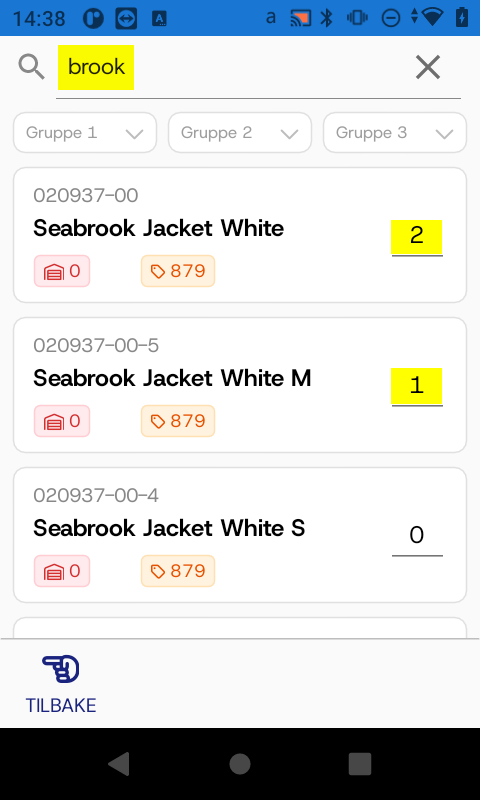
Trykk "tilbake" når alle varer er lagt til med riktig antall. Antall kan fortsatt endres i salgsordren.
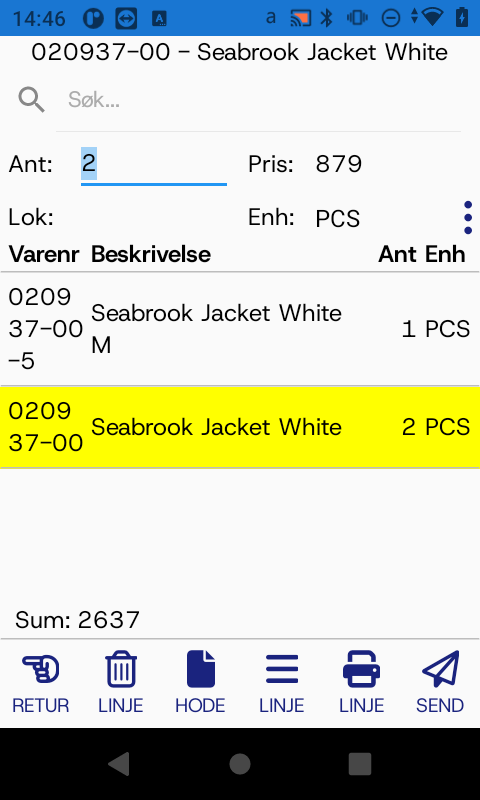
Trykk "send" for å ferdigstille salget.
- [BxLogistics Installasjon](https://kb.bxsoftware.no/hjelp/bxlogistics-installasjon?hsLang=no-no#main-content)
- [BxEngine og BxSmartPrintPro](https://kb.bxsoftware.no/hjelp/bxlogistics-installasjon?hsLang=no-no#bxengine-og-bxsmartprintpro)
- [BxLogistics](https://kb.bxsoftware.no/hjelp/bxlogistics-installasjon?hsLang=no-no#bxlogistics)
- [ERP Integrasjoner og oppsett](https://kb.bxsoftware.no/hjelp/erp-integrasjoner-og-oppsett?hsLang=no-no#main-content)
- [Visma Business](https://kb.bxsoftware.no/hjelp/erp-integrasjoner-og-oppsett?hsLang=no-no#visma-business)
- [Business NXT](https://kb.bxsoftware.no/hjelp/erp-integrasjoner-og-oppsett?hsLang=no-no#business-nxt)
- [Tripletex](https://kb.bxsoftware.no/hjelp/erp-integrasjoner-og-oppsett?hsLang=no-no#tripletex)
- [Visma Net](https://kb.bxsoftware.no/hjelp/erp-integrasjoner-og-oppsett?hsLang=no-no#visma-net)
- [Xledger](https://kb.bxsoftware.no/hjelp/erp-integrasjoner-og-oppsett?hsLang=no-no#xledger)
- [Rackbeat](https://kb.bxsoftware.no/hjelp/erp-integrasjoner-og-oppsett?hsLang=no-no#rackbeat)
- [Fraktintegrasjoner](https://kb.bxsoftware.no/hjelp/fraktintegrasjoner?hsLang=no-no#main-content)
- [AxiaFrakt](https://kb.bxsoftware.no/hjelp/fraktintegrasjoner?hsLang=no-no#axiafrakt)
- [Logistra Cargonizer](https://kb.bxsoftware.no/hjelp/fraktintegrasjoner?hsLang=no-no#logistra-cargonizer)
- [ERP leveringsmetoder](https://kb.bxsoftware.no/hjelp/fraktintegrasjoner?hsLang=no-no#erp-leveringsmetoder)
- [nShift Shipment Server](https://kb.bxsoftware.no/hjelp/fraktintegrasjoner?hsLang=no-no#nshift-shipment-server)
- [nShift/Unifaun Online](https://kb.bxsoftware.no/hjelp/fraktintegrasjoner?hsLang=no-no#nshift-unifaun-online)
- [nShift/Consignor OnPrem](https://kb.bxsoftware.no/hjelp/fraktintegrasjoner?hsLang=no-no#nshift-consignor-onprem)
- [Brukermanualer BxMobile](https://kb.bxsoftware.no/hjelp/brukermanualer-bxmobile?hsLang=no-no#main-content)
- [Generelt](https://kb.bxsoftware.no/hjelp/brukermanualer-bxmobile?hsLang=no-no#generelt)
- [Introduksjon](https://kb.bxsoftware.no/hjelp/brukermanualer-bxmobile?hsLang=no-no#introduksjon)
- [Salg](https://kb.bxsoftware.no/hjelp/brukermanualer-bxmobile?hsLang=no-no#salg)
- [Varetelling](https://kb.bxsoftware.no/hjelp/brukermanualer-bxmobile?hsLang=no-no#varetelling)
- [Vareplukk](https://kb.bxsoftware.no/hjelp/brukermanualer-bxmobile?hsLang=no-no#vareplukk)
- [Fraktbestilling](https://kb.bxsoftware.no/hjelp/brukermanualer-bxmobile?hsLang=no-no#fraktbestilling)
- [Varemottak](https://kb.bxsoftware.no/hjelp/brukermanualer-bxmobile?hsLang=no-no#varemottak)
- [Vareflytting](https://kb.bxsoftware.no/hjelp/brukermanualer-bxmobile?hsLang=no-no#vareflytting)
- [Lageroverføring](https://kb.bxsoftware.no/hjelp/brukermanualer-bxmobile?hsLang=no-no#lageroverf%C3%B8ring)
- [Etiketter](https://kb.bxsoftware.no/hjelp/brukermanualer-bxmobile?hsLang=no-no#etiketter)
- [Utlevering](https://kb.bxsoftware.no/hjelp/brukermanualer-bxmobile?hsLang=no-no#utlevering)
- [Varer](https://kb.bxsoftware.no/hjelp/brukermanualer-bxmobile?hsLang=no-no#varer)
- [Innkjøp](https://kb.bxsoftware.no/hjelp/brukermanualer-bxmobile?hsLang=no-no#innkj%C3%B8p)
- [Brukermanualer BxWebManager](https://kb.bxsoftware.no/hjelp/brukermanualer-bxwebmanager?hsLang=no-no#main-content)
- [General](https://kb.bxsoftware.no/hjelp/brukermanualer-bxwebmanager?hsLang=no-no#general)
- [Labels](https://kb.bxsoftware.no/hjelp/brukermanualer-bxwebmanager?hsLang=no-no#labels)
- [Teknisk Dokumentasjon](https://kb.bxsoftware.no/hjelp/teknisk-dokumentasjon?hsLang=no-no#main-content)
- [BxAdmin - Client UI](https://kb.bxsoftware.no/hjelp/teknisk-dokumentasjon?hsLang=no-no#bxadmin-client-ui)
- [BxSmartPrintPro](https://kb.bxsoftware.no/hjelp/teknisk-dokumentasjon?hsLang=no-no#bxsmartprintpro)
- [Plukk - Fraktbestilling](https://kb.bxsoftware.no/hjelp/teknisk-dokumentasjon?hsLang=no-no#plukk-fraktbestilling)
- [BxMobile](https://kb.bxsoftware.no/hjelp/teknisk-dokumentasjon?hsLang=no-no#bxmobile)
- [Infrastruktur](https://kb.bxsoftware.no/hjelp/teknisk-dokumentasjon?hsLang=no-no#infrastruktur)
- [Visma Global spesifikt](https://kb.bxsoftware.no/hjelp/teknisk-dokumentasjon?hsLang=no-no#visma-global-spesifikt)
- [Visma Business spesifikt](https://kb.bxsoftware.no/hjelp/teknisk-dokumentasjon?hsLang=no-no#visma-business-spesifikt)
- [VismaNet spesifikt](https://kb.bxsoftware.no/hjelp/teknisk-dokumentasjon?hsLang=no-no#vismanet-spesifikt)
- [BusinessNxt spesifikt](https://kb.bxsoftware.no/hjelp/teknisk-dokumentasjon?hsLang=no-no#businessnxt-spesifikt)
- [Varetelling](https://kb.bxsoftware.no/hjelp/varetelling?hsLang=no-no#main-content)
- [Tellemetoder](https://kb.bxsoftware.no/hjelp/varetelling?hsLang=no-no#tellemetoder)
- [Visma Net](https://kb.bxsoftware.no/hjelp/varetelling?hsLang=no-no#visma-net)
- [Business NXT](https://kb.bxsoftware.no/hjelp/varetelling?hsLang=no-no#business-nxt)
- [Tripletex](https://kb.bxsoftware.no/hjelp/varetelling?hsLang=no-no#tripletex)
- [Visma Business](https://kb.bxsoftware.no/hjelp/varetelling?hsLang=no-no#visma-business)
- [Visma Global](https://kb.bxsoftware.no/hjelp/varetelling?hsLang=no-no#visma-global)
- [Generelt](https://kb.bxsoftware.no/hjelp/varetelling?hsLang=no-no#generelt)
- [Logistikk](https://kb.bxsoftware.no/hjelp/logistikk?hsLang=no-no#main-content)
- [Lokasjon](https://kb.bxsoftware.no/hjelp/logistikk?hsLang=no-no#lokasjon)
- [Feilsøking](https://kb.bxsoftware.no/hjelp/feils%C3%B8king?hsLang=no-no#main-content)
- [Frakt](https://kb.bxsoftware.no/hjelp/feils%C3%B8king?hsLang=no-no#frakt)
- [Visma Net](https://kb.bxsoftware.no/hjelp/feils%C3%B8king?hsLang=no-no#visma-net)
- [BxMobile](https://kb.bxsoftware.no/hjelp/feils%C3%B8king?hsLang=no-no#bxmobile)
- [BxSmartPrintPro](https://kb.bxsoftware.no/hjelp/feils%C3%B8king?hsLang=no-no#bxsmartprintpro)
- [Visma Business](https://kb.bxsoftware.no/hjelp/feils%C3%B8king?hsLang=no-no#visma-business)
- [BxAdmin](https://kb.bxsoftware.no/hjelp/feils%C3%B8king?hsLang=no-no#bxadmin)
- [BxAPI](https://kb.bxsoftware.no/hjelp/bxapi?hsLang=no-no)
- [Videoarkiv](https://kb.bxsoftware.no/hjelp/videoarkiv?hsLang=no-no#main-content)
- [Salg](https://kb.bxsoftware.no/hjelp/videoarkiv?hsLang=no-no#salg)
- [Plukk](https://kb.bxsoftware.no/hjelp/videoarkiv?hsLang=no-no#plukk)
- [Lagertelling](https://kb.bxsoftware.no/hjelp/videoarkiv?hsLang=no-no#lagertelling)
- [Generelt](https://kb.bxsoftware.no/hjelp/videoarkiv?hsLang=no-no#generelt)
- [BxWebManager](https://kb.bxsoftware.no/hjelp/videoarkiv?hsLang=no-no#bxwebmanager)
[](https://www.bxlogistics.no/)
Karihaugveien 89, Oslo, Norway
[mailto:support@bxsoftware.no](mailto:support@bxsoftware.no)
Copyright © 2025, BxSoftware AS