---
title: Aktivering av Bx skjermbilder i Visma Net
description: Aktivering av Bx skjermbilder i Visma Net (UI Automations)
---
[Gå til innhold](https://kb.bxsoftware.no/hjelp/aktivering-av-bx-skjermbilder-i-visma-net#main-content)
Norsk – Norge
Vis undermeny for oversettelser
[](https://www.bxlogistics.no/)
- [Henvendelser](https://kb.bxsoftware.no/tickets)
- [Selvhjelp](https://kb.bxsoftware.no/hjelp)
- [Logg ut](https://kb.bxsoftware.no/_hcms/mem/logout)
Åpne hovednavigasjon
Lukk hovednavigasjon
- [Henvendelser](https://kb.bxsoftware.no/tickets)
- [Selvhjelp](https://kb.bxsoftware.no/hjelp)
- [Logg ut](https://kb.bxsoftware.no/_hcms/mem/logout)
- Norsk – Norge
Vis undermeny for oversettelser
Hvordan kan vi hjelpe deg?
- Det finnes ingen forslag fordi søkefeltet er tomt.
1. [Selvhjelp](https://kb.bxsoftware.no/hjelp?hsLang=no-no)
2. [Teknisk Dokumentasjon](https://kb.bxsoftware.no/hjelp/teknisk-dokumentasjon?hsLang=no-no)
3. [VismaNet spesifikt](https://kb.bxsoftware.no/hjelp/teknisk-dokumentasjon?hsLang=no-no#vismanet-spesifikt)
# Aktivering av Bx skjermbilder i Visma Net
## Flere av funksjonene i Bx kan integreres direkte i Visma Net. I denne artikkelen forklarer vi hvordan du kommer i gang.
Prosessen for å legge til skjermbilder er delt i tre. Det er viktig at du følger alle punktene under.
**Integrasjonstilganger**
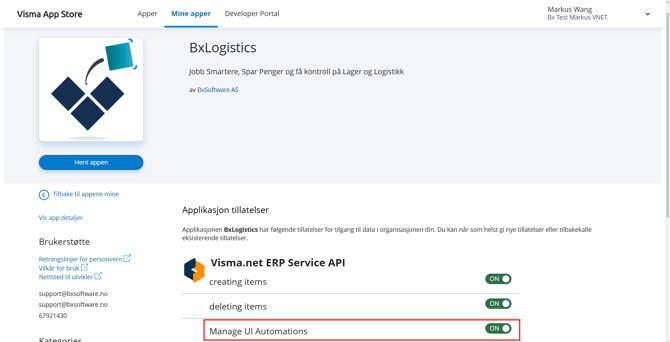
1. Logg på Visma App store og naviger til BxLogistics
https://apps.visma.com/myapps/isv\_bxengine
2. Under Applikasjons tillatelser, aktiver *Manage UI Automations*
3. Klikk "Oppdater tillatelser" nederst i skjermbilde
Merk at de andre tillatelsene fortsatt må være aktivert for at Bx skal fungere mot Visma Net
**Aktivering av skjermbilder**
Aktivering av ønskede skjermbilder og funksjonalitet må gjøres av Bx Support og bestilles på support@bxsoftware.no.
Følgende skjermbilder kan legges til:
- BxWM Labels
- BxWM Stock Count
- BxWM Transport (krever ekstra lisens)
- BxWM Delivery Manager (krever ekstra lisens)
Følgende behandlinger / actions kan legges til:
- BxWM Transport (krever ekstra lisens)
**Legge til skjermbilder i menyen**
Når Bx har aktivert må elementene legges til i menyen i Visma Net.
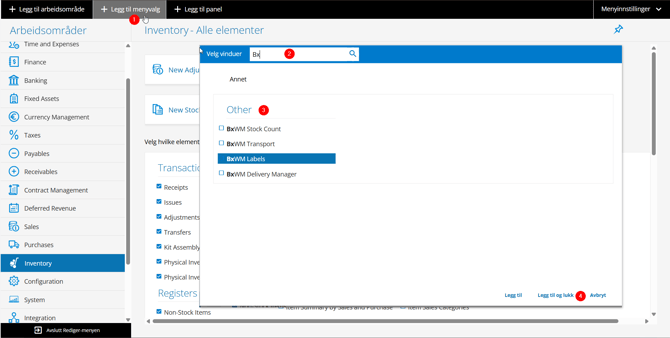
1. Klikk på "Rediger meny" nederst i hovedmenyen
2. Naviger til ønsket menypunkt og klikk "Legg til menyvalg"
3. Søk opp Bx skjermbildet du ønsker og legge til
4. Klikk "Legg til og lukk"
5. Når alle menyelementene er lagt till klikker du "Avslutt Rediger-menyen"
- [BxLogistics Installasjon](https://kb.bxsoftware.no/hjelp/bxlogistics-installasjon?hsLang=no-no#main-content)
- [BxEngine og BxSmartPrintPro](https://kb.bxsoftware.no/hjelp/bxlogistics-installasjon?hsLang=no-no#bxengine-og-bxsmartprintpro)
- [BxLogistics](https://kb.bxsoftware.no/hjelp/bxlogistics-installasjon?hsLang=no-no#bxlogistics)
- [ERP Integrasjoner og oppsett](https://kb.bxsoftware.no/hjelp/erp-integrasjoner-og-oppsett?hsLang=no-no#main-content)
- [Visma Business](https://kb.bxsoftware.no/hjelp/erp-integrasjoner-og-oppsett?hsLang=no-no#visma-business)
- [Business NXT](https://kb.bxsoftware.no/hjelp/erp-integrasjoner-og-oppsett?hsLang=no-no#business-nxt)
- [Tripletex](https://kb.bxsoftware.no/hjelp/erp-integrasjoner-og-oppsett?hsLang=no-no#tripletex)
- [Visma Net](https://kb.bxsoftware.no/hjelp/erp-integrasjoner-og-oppsett?hsLang=no-no#visma-net)
- [Xledger](https://kb.bxsoftware.no/hjelp/erp-integrasjoner-og-oppsett?hsLang=no-no#xledger)
- [Rackbeat](https://kb.bxsoftware.no/hjelp/erp-integrasjoner-og-oppsett?hsLang=no-no#rackbeat)
- [Fraktintegrasjoner og oppsett](https://kb.bxsoftware.no/hjelp/fraktintegrasjoner-og-oppsett?hsLang=no-no#main-content)
- [AxiaFrakt](https://kb.bxsoftware.no/hjelp/fraktintegrasjoner-og-oppsett?hsLang=no-no#axiafrakt)
- [Logistra Cargonizer](https://kb.bxsoftware.no/hjelp/fraktintegrasjoner-og-oppsett?hsLang=no-no#logistra-cargonizer)
- [ERP leveringsmetoder](https://kb.bxsoftware.no/hjelp/fraktintegrasjoner-og-oppsett?hsLang=no-no#erp-leveringsmetoder)
- [nShift Shipment Server](https://kb.bxsoftware.no/hjelp/fraktintegrasjoner-og-oppsett?hsLang=no-no#nshift-shipment-server)
- [nShift/Unifaun Online](https://kb.bxsoftware.no/hjelp/fraktintegrasjoner-og-oppsett?hsLang=no-no#nshift-unifaun-online)
- [nShift/Consignor OnPrem](https://kb.bxsoftware.no/hjelp/fraktintegrasjoner-og-oppsett?hsLang=no-no#nshift-consignor-onprem)
- [Brukermanualer BxMobile](https://kb.bxsoftware.no/hjelp/brukermanualer-bxmobile?hsLang=no-no#main-content)
- [Generelt](https://kb.bxsoftware.no/hjelp/brukermanualer-bxmobile?hsLang=no-no#generelt)
- [Introduksjon](https://kb.bxsoftware.no/hjelp/brukermanualer-bxmobile?hsLang=no-no#introduksjon)
- [Salg](https://kb.bxsoftware.no/hjelp/brukermanualer-bxmobile?hsLang=no-no#salg)
- [Varetelling](https://kb.bxsoftware.no/hjelp/brukermanualer-bxmobile?hsLang=no-no#varetelling)
- [Vareplukk](https://kb.bxsoftware.no/hjelp/brukermanualer-bxmobile?hsLang=no-no#vareplukk)
- [Fraktbestilling](https://kb.bxsoftware.no/hjelp/brukermanualer-bxmobile?hsLang=no-no#fraktbestilling)
- [Varemottak](https://kb.bxsoftware.no/hjelp/brukermanualer-bxmobile?hsLang=no-no#varemottak)
- [Vareflytting](https://kb.bxsoftware.no/hjelp/brukermanualer-bxmobile?hsLang=no-no#vareflytting)
- [Lageroverføring](https://kb.bxsoftware.no/hjelp/brukermanualer-bxmobile?hsLang=no-no#lageroverf%C3%B8ring)
- [Etiketter](https://kb.bxsoftware.no/hjelp/brukermanualer-bxmobile?hsLang=no-no#etiketter)
- [Utlevering](https://kb.bxsoftware.no/hjelp/brukermanualer-bxmobile?hsLang=no-no#utlevering)
- [Varer](https://kb.bxsoftware.no/hjelp/brukermanualer-bxmobile?hsLang=no-no#varer)
- [Innkjøp](https://kb.bxsoftware.no/hjelp/brukermanualer-bxmobile?hsLang=no-no#innkj%C3%B8p)
- [Plukk](https://kb.bxsoftware.no/hjelp/brukermanualer-bxmobile?hsLang=no-no#plukk)
- [Brukermanualer BxWebManager](https://kb.bxsoftware.no/hjelp/brukermanualer-bxwebmanager?hsLang=no-no#main-content)
- [General](https://kb.bxsoftware.no/hjelp/brukermanualer-bxwebmanager?hsLang=no-no#general)
- [Labels](https://kb.bxsoftware.no/hjelp/brukermanualer-bxwebmanager?hsLang=no-no#labels)
- [Teknisk Dokumentasjon](https://kb.bxsoftware.no/hjelp/teknisk-dokumentasjon?hsLang=no-no#main-content)
- [BxAdmin - Client UI](https://kb.bxsoftware.no/hjelp/teknisk-dokumentasjon?hsLang=no-no#bxadmin-client-ui)
- [BxSmartPrintPro](https://kb.bxsoftware.no/hjelp/teknisk-dokumentasjon?hsLang=no-no#bxsmartprintpro)
- [Plukk](https://kb.bxsoftware.no/hjelp/teknisk-dokumentasjon?hsLang=no-no#plukk)
- [BxMobile](https://kb.bxsoftware.no/hjelp/teknisk-dokumentasjon?hsLang=no-no#bxmobile)
- [Infrastruktur](https://kb.bxsoftware.no/hjelp/teknisk-dokumentasjon?hsLang=no-no#infrastruktur)
- [Visma Global spesifikt](https://kb.bxsoftware.no/hjelp/teknisk-dokumentasjon?hsLang=no-no#visma-global-spesifikt)
- [Visma Business spesifikt](https://kb.bxsoftware.no/hjelp/teknisk-dokumentasjon?hsLang=no-no#visma-business-spesifikt)
- [VismaNet spesifikt](https://kb.bxsoftware.no/hjelp/teknisk-dokumentasjon?hsLang=no-no#vismanet-spesifikt)
- [BusinessNxt spesifikt](https://kb.bxsoftware.no/hjelp/teknisk-dokumentasjon?hsLang=no-no#businessnxt-spesifikt)
- [Varetelling](https://kb.bxsoftware.no/hjelp/varetelling?hsLang=no-no#main-content)
- [Tellemetoder](https://kb.bxsoftware.no/hjelp/varetelling?hsLang=no-no#tellemetoder)
- [Visma Net](https://kb.bxsoftware.no/hjelp/varetelling?hsLang=no-no#visma-net)
- [Business NXT](https://kb.bxsoftware.no/hjelp/varetelling?hsLang=no-no#business-nxt)
- [Tripletex](https://kb.bxsoftware.no/hjelp/varetelling?hsLang=no-no#tripletex)
- [Visma Business](https://kb.bxsoftware.no/hjelp/varetelling?hsLang=no-no#visma-business)
- [Visma Global](https://kb.bxsoftware.no/hjelp/varetelling?hsLang=no-no#visma-global)
- [Generelt](https://kb.bxsoftware.no/hjelp/varetelling?hsLang=no-no#generelt)
- [Logistikk](https://kb.bxsoftware.no/hjelp/logistikk?hsLang=no-no#main-content)
- [Lokasjon](https://kb.bxsoftware.no/hjelp/logistikk?hsLang=no-no#lokasjon)
- [Feilsøking](https://kb.bxsoftware.no/hjelp/feils%C3%B8king?hsLang=no-no#main-content)
- [Frakt](https://kb.bxsoftware.no/hjelp/feils%C3%B8king?hsLang=no-no#frakt)
- [Visma Net](https://kb.bxsoftware.no/hjelp/feils%C3%B8king?hsLang=no-no#visma-net)
- [BxMobile](https://kb.bxsoftware.no/hjelp/feils%C3%B8king?hsLang=no-no#bxmobile)
- [BxSmartPrintPro](https://kb.bxsoftware.no/hjelp/feils%C3%B8king?hsLang=no-no#bxsmartprintpro)
- [Visma Business](https://kb.bxsoftware.no/hjelp/feils%C3%B8king?hsLang=no-no#visma-business)
- [BxAdmin](https://kb.bxsoftware.no/hjelp/feils%C3%B8king?hsLang=no-no#bxadmin)
- [BxAPI](https://kb.bxsoftware.no/hjelp/bxapi?hsLang=no-no)
- [Videoarkiv](https://kb.bxsoftware.no/hjelp/videoarkiv?hsLang=no-no#main-content)
- [Salg](https://kb.bxsoftware.no/hjelp/videoarkiv?hsLang=no-no#salg)
- [Plukk](https://kb.bxsoftware.no/hjelp/videoarkiv?hsLang=no-no#plukk)
- [Lagertelling](https://kb.bxsoftware.no/hjelp/videoarkiv?hsLang=no-no#lagertelling)
- [Generelt](https://kb.bxsoftware.no/hjelp/videoarkiv?hsLang=no-no#generelt)
- [BxWebManager](https://kb.bxsoftware.no/hjelp/videoarkiv?hsLang=no-no#bxwebmanager)
[](https://www.bxlogistics.no/)
Karihaugveien 89, Oslo, Norway
[mailto:support@bxsoftware.no](mailto:support@bxsoftware.no)
Copyright © 2025, BxSoftware AS