---
title: Pop-up dialogue for picking and receiving, head and lines
description: Setup for receiving an extra notification on the handheld terminalOppsett for å få en ekstra beskjed på terminalen
---
[Skip to content](https://kb.bxsoftware.no/en/hjelp/pop-up-dialog-på-plukk-og-mottak-hode-og-linjer#main-content)
- [English](https://kb.bxsoftware.no/en/hjelp/pop-up-dialog-p%C3%A5-plukk-og-mottak-hode-og-linjer)
- [Norsk – Norge](https://kb.bxsoftware.no/hjelp/pop-up-dialog)
English
Show submenu for translations
[](https://www.bxlogistics.no/)
- [Henvendelser](https://kb.bxsoftware.no/tickets)
- [Selvhjelp](https://kb.bxsoftware.no/hjelp)
- [Logg ut](https://kb.bxsoftware.no/_hcms/mem/logout)
Open main navigation
Close main navigation
- [Henvendelser](https://kb.bxsoftware.no/tickets)
- [Selvhjelp](https://kb.bxsoftware.no/hjelp)
- [Logg ut](https://kb.bxsoftware.no/_hcms/mem/logout)
- - [English](https://kb.bxsoftware.no/en/hjelp/pop-up-dialog-p%C3%A5-plukk-og-mottak-hode-og-linjer)
- [Norsk – Norge](https://kb.bxsoftware.no/hjelp/pop-up-dialog)
English
Show submenu for translations
How can we help you?
- There are no suggestions because the search field is empty.
1. [Selvhjelp](https://kb.bxsoftware.no/en/hjelp?hsLang=en)
2. [Technical Documentation](https://kb.bxsoftware.no/en/hjelp/technical-documentation?hsLang=en)
# Pop-up dialogue for picking and receiving, head and lines
## Setup for receiving an extra notification on the handheld terminalOppsett for å få en ekstra beskjed på terminalen
The information retrieved depends on which SQL field in the ERP you are pulling the information from. The examples below are based on Visma.net.
A pop-up dialogue will only appear if there is something in the selected field. You can use *case* in the SQL query if the pop-up is meant to appear only based on customer number or other parameters.
**Picking**
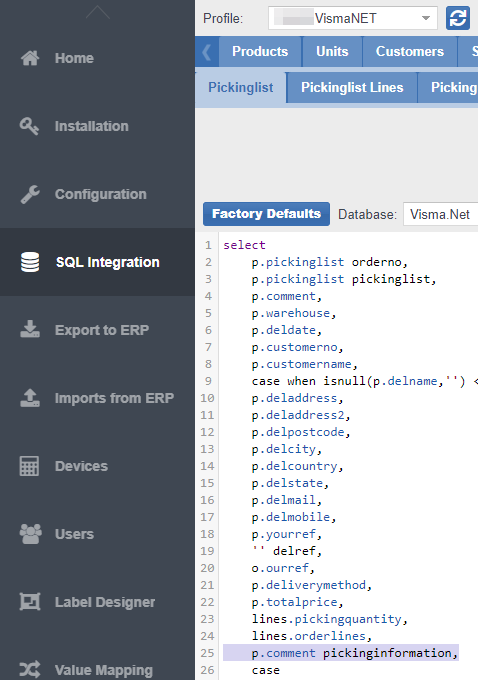
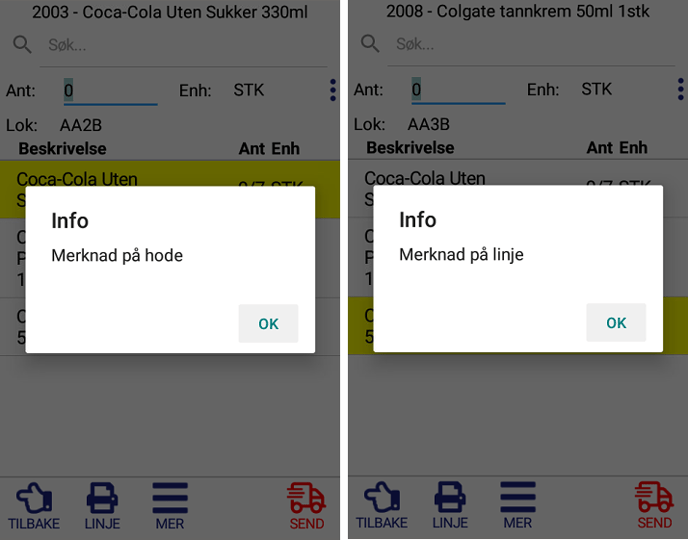
Use *PickingInformation* in the Pickinglist for a pop-up dialogue when the picking list is opened.
Example:
```
SELECT p.comment pickinginformation FROM BxPickinglist p
```
CASE example:
```
SELECT CASE WHEN p.customerno = '123456' THEN p.comment ELSE '' END pickinginformation.FROM BxPickinglist p
```
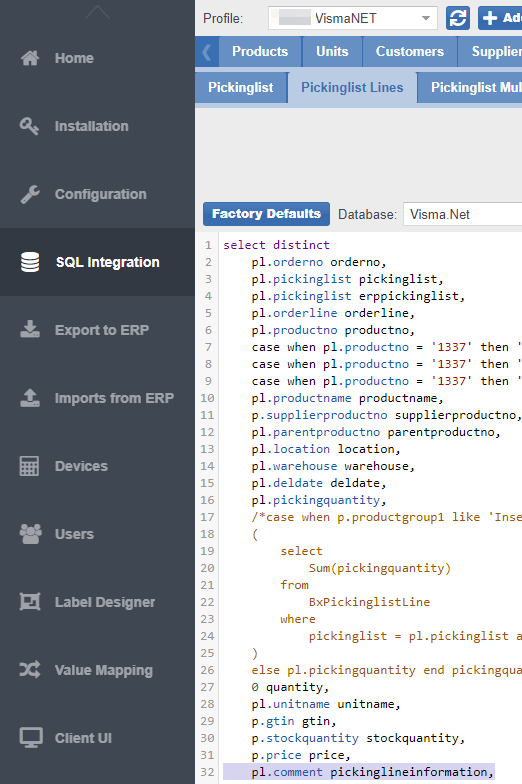
Use *PickinglineInformation* in the Pickinglist Line for a pop-up dialogue when a specific product line is selected
Example:
```
SELECT pl.comment AS pickinglineinformation FROM BxPickinglistLine pl
```
**Receiving**
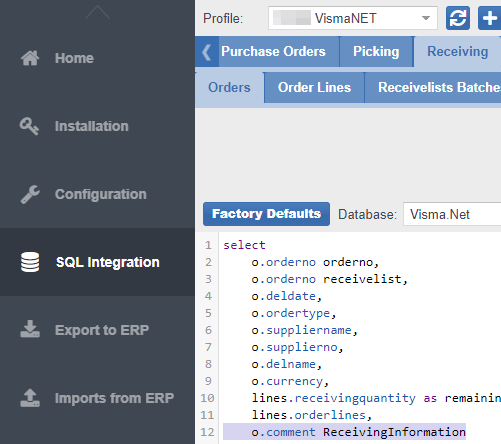
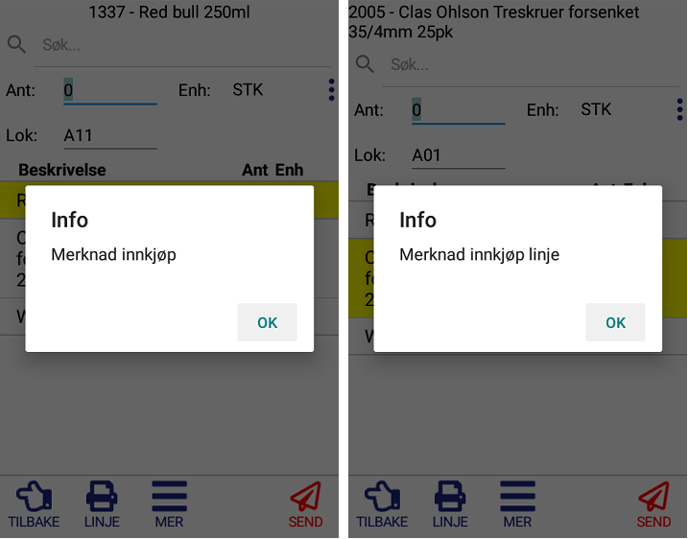
Similar to picking, use *ReceivingInformation* in the Receivelist for a pop-up when the purchase order is selected.
Example:
```
SELECT o.comment AS ReceivingInformationFROM BxReceivelist o
```
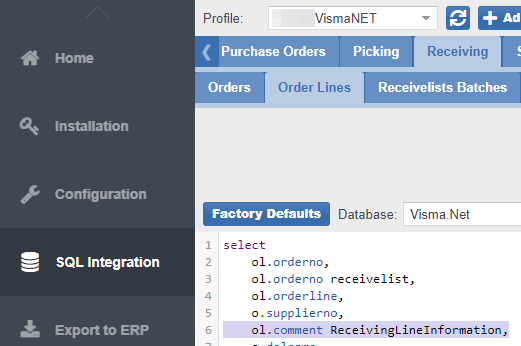
Use *ReceivingLineInformation* in the ReceivelistLines for a pop-up when the line is selected
Example:
```
SELECT ol.comment AS ReceivingLineInformationFROM BxReceivelistLine ol
```
- [BxLogistics Installation](https://kb.bxsoftware.no/en/hjelp/bxlogistics-installation?hsLang=en#main-content)
- [BxEngine and BxSmartPrintPro](https://kb.bxsoftware.no/en/hjelp/bxlogistics-installation?hsLang=en#bxengine-and-bxsmartprintpro)
- [BxLogistics](https://kb.bxsoftware.no/en/hjelp/bxlogistics-installation?hsLang=en#bxlogistics)
- [ERP Integrations and setup](https://kb.bxsoftware.no/en/hjelp/erp-integrations-and-setup?hsLang=en#main-content)
- [Visma Business](https://kb.bxsoftware.no/en/hjelp/erp-integrations-and-setup?hsLang=en#visma-business)
- [VBNxt](https://kb.bxsoftware.no/en/hjelp/erp-integrations-and-setup?hsLang=en#vbnxt)
- [Visma Net](https://kb.bxsoftware.no/en/hjelp/erp-integrations-and-setup?hsLang=en#visma-net)
- [Xledger](https://kb.bxsoftware.no/en/hjelp/erp-integrations-and-setup?hsLang=en#xledger)
- [Transport integrations](https://kb.bxsoftware.no/en/hjelp/transport-integrations?hsLang=en#main-content)
- [AxiaFrakt](https://kb.bxsoftware.no/en/hjelp/transport-integrations?hsLang=en#axiafrakt)
- [Logistra Cargonizer](https://kb.bxsoftware.no/en/hjelp/transport-integrations?hsLang=en#logistra-cargonizer)
- [ERP delivery methods](https://kb.bxsoftware.no/en/hjelp/transport-integrations?hsLang=en#erp-delivery-methods)
- [nShift Shipment Server](https://kb.bxsoftware.no/en/hjelp/transport-integrations?hsLang=en#nshift-shipment-server)
- [nShift/Unifaun Online](https://kb.bxsoftware.no/en/hjelp/transport-integrations?hsLang=en#nshift-unifaun-online)
- [nShift/Consignor OnPrem](https://kb.bxsoftware.no/en/hjelp/transport-integrations?hsLang=en#nshift-consignor-onprem)
- [User guides BxMobile](https://kb.bxsoftware.no/en/hjelp/user-guides-bxmobile?hsLang=en#main-content)
- [General](https://kb.bxsoftware.no/en/hjelp/user-guides-bxmobile?hsLang=en#general)
- [Stock transfer](https://kb.bxsoftware.no/en/hjelp/user-guides-bxmobile?hsLang=en#stock-transfer)
- [Products](https://kb.bxsoftware.no/en/hjelp/user-guides-bxmobile?hsLang=en#products)
- [Stock count](https://kb.bxsoftware.no/en/hjelp/user-guides-bxmobile?hsLang=en#stock-count)
- [User Guides BxWebManager](https://kb.bxsoftware.no/en/hjelp/user-guides-bxwebmanager?hsLang=en#main-content)
- [General](https://kb.bxsoftware.no/en/hjelp/user-guides-bxwebmanager?hsLang=en#general)
- [Labels](https://kb.bxsoftware.no/en/hjelp/user-guides-bxwebmanager?hsLang=en#labels)
- [Technical Documentation](https://kb.bxsoftware.no/en/hjelp/technical-documentation?hsLang=en#main-content)
- [BxAdmin - Client UI](https://kb.bxsoftware.no/en/hjelp/technical-documentation?hsLang=en#bxadmin-client-ui)
- [BxSmartPrintPro](https://kb.bxsoftware.no/en/hjelp/technical-documentation?hsLang=en#bxsmartprintpro)
- [Picking - Freight booking](https://kb.bxsoftware.no/en/hjelp/technical-documentation?hsLang=en#picking-freight-booking)
- [Infrastructure](https://kb.bxsoftware.no/en/hjelp/technical-documentation?hsLang=en#infrastructure)
- [Visma Global specific](https://kb.bxsoftware.no/en/hjelp/technical-documentation?hsLang=en#visma-global-specific)
- [Visma Business specific](https://kb.bxsoftware.no/en/hjelp/technical-documentation?hsLang=en#visma-business-specific)
- [VismaNet specific](https://kb.bxsoftware.no/en/hjelp/technical-documentation?hsLang=en#vismanet-specific)
- [Stock count](https://kb.bxsoftware.no/en/hjelp/stock-count?hsLang=en#main-content)
- [Visma Net](https://kb.bxsoftware.no/en/hjelp/stock-count?hsLang=en#visma-net)
- [Logistics](https://kb.bxsoftware.no/en/hjelp/logistics?hsLang=en#main-content)
- [Location](https://kb.bxsoftware.no/en/hjelp/logistics?hsLang=en#location)
- [Troubleshooting](https://kb.bxsoftware.no/en/hjelp/troubleshooting?hsLang=en#main-content)
- [Freight](https://kb.bxsoftware.no/en/hjelp/troubleshooting?hsLang=en#freight)
- [Visma Net](https://kb.bxsoftware.no/en/hjelp/troubleshooting?hsLang=en#visma-net)
- [BxMobile](https://kb.bxsoftware.no/en/hjelp/troubleshooting?hsLang=en#bxmobile)
- [BxSmartPrintPro](https://kb.bxsoftware.no/en/hjelp/troubleshooting?hsLang=en#bxsmartprintpro)
- [Visma Business](https://kb.bxsoftware.no/en/hjelp/troubleshooting?hsLang=en#visma-business)
- [BxAdmin](https://kb.bxsoftware.no/en/hjelp/troubleshooting?hsLang=en#bxadmin)
- [BxAPI](https://kb.bxsoftware.no/en/hjelp/bxapi?hsLang=en)
- [Video archive](https://kb.bxsoftware.no/en/hjelp/video-archive?hsLang=en#main-content)
- [Sales](https://kb.bxsoftware.no/en/hjelp/video-archive?hsLang=en#sales)
- [Stock pick](https://kb.bxsoftware.no/en/hjelp/video-archive?hsLang=en#stock-pick)
- [Stock count](https://kb.bxsoftware.no/en/hjelp/video-archive?hsLang=en#stock-count)
- [General](https://kb.bxsoftware.no/en/hjelp/video-archive?hsLang=en#general)
- [BxWebManager](https://kb.bxsoftware.no/en/hjelp/video-archive?hsLang=en#bxwebmanager)
[](https://www.bxlogistics.no/)
Karihaugveien 89, Oslo, Norway
[mailto:support@bxsoftware.no](mailto:support@bxsoftware.no)
Copyright © 2025, BxSoftware AS