---
title: Client UI component - column and numericcolumn
description: How to set up the column and numericcolumn components in Client UI
---
[Skip to content](https://kb.bxsoftware.no/en/hjelp/client-ui-komponent-column-og-numericcolumn#main-content)
- [English](https://kb.bxsoftware.no/en/hjelp/client-ui-komponent-column-og-numericcolumn)
- [Norsk – Norge](https://kb.bxsoftware.no/hjelp/client-ui-komponent-column)
English
Show submenu for translations
[](https://www.bxlogistics.no/)
- [Henvendelser](https://kb.bxsoftware.no/tickets)
- [Selvhjelp](https://kb.bxsoftware.no/hjelp)
- [Logg ut](https://kb.bxsoftware.no/_hcms/mem/logout)
Open main navigation
Close main navigation
- [Henvendelser](https://kb.bxsoftware.no/tickets)
- [Selvhjelp](https://kb.bxsoftware.no/hjelp)
- [Logg ut](https://kb.bxsoftware.no/_hcms/mem/logout)
- - [English](https://kb.bxsoftware.no/en/hjelp/client-ui-komponent-column-og-numericcolumn)
- [Norsk – Norge](https://kb.bxsoftware.no/hjelp/client-ui-komponent-column)
English
Show submenu for translations
How can we help you?
- There are no suggestions because the search field is empty.
1. [Selvhjelp](https://kb.bxsoftware.no/en/hjelp?hsLang=en)
2. [Technical Documentation](https://kb.bxsoftware.no/en/hjelp/technical-documentation?hsLang=en)
3. [BxAdmin - Client UI](https://kb.bxsoftware.no/en/hjelp/technical-documentation?hsLang=en#bxadmin-client-ui)
# Client UI component - column and numericcolumn
## How to set up the column and numericcolumn components in Client UI
The column and numericcolumn components can be used to add additional columns in the various modules in BxMobile. This gives the ability to add more information about an order or order line from the ERP system. To do this, configurations must be made in the Client UI and SQL integration.
1. [Client UI](https://kb.bxsoftware.no/en/hjelp/client-ui-komponent-column-og-numericcolumn#clientui)
2. [SQL Integration](https://kb.bxsoftware.no/en/hjelp/client-ui-komponent-column-og-numericcolumn#sqlintegration)
3. [BxMobile](https://kb.bxsoftware.no/en/hjelp/client-ui-komponent-column-og-numericcolumn#bxmobile)
#### 1. Client UI
In BxAdmin under the Client UI section, click **Add**. Fill in the correct Screen name, which in this case is `PickingList`, and then the name of the field. Click **Confirm** to complete.

Once the field is added, the rest of the columns can be adjusted as needed. Fill out X-pos and Width with the appropriate values to ensure correct placement and width on the screen. As the terminals can vary, it might take some trial and error to find the optimal width.
If the column retrieves information from a product line/order line, Source Object will be filled out with "lines".Hvis kolonnen henter informasjon fra varelinje/ordrelinje, fylles Source Object med "lines". Hvis det er en hodeverdi som skal vises i ordrehode felter i Plukk eller Mottak modulen, trenger man ikke fylle ut Source Object. Source Field fylles ut med navn på feltet fra korrekt spørring for modulen dette settes opp i. Man kan også bytte hvilken profil feltet skal høre til, om man har flere profiler uten behov for feltet.
| **Screen** | Ble fylt ut når felt ble lagt til, kan justeres ved behov. Fra denne artikkelen er **PickingList** og **PickingMenu** korrekt. |
| --- | --- |
| **Name** | Samme som med Screen, i dette tilfellet kaller vi feltene **Linje**/**tallinfo**/**postnr**. |
| **Enabled** | true - ble fylt ut automatisk når felt ble lagt til, slå av eller på som ønsket |
| **Source Object** | **lines** - med column og numericcolumn komponentene hentes linjeverdi basert på om lines fylles ut i Source Object, skal ikke ha lines. prefix i Source Field som andre komponenter krever |
| **Source Field** | **information**, **numberinformation** og **delpostcode** er feltene vi henter informasjon fra i dette tilfellet. |
| **Visible** | true |
| **X-pos** | I dette tilfellet er **3**, **4** og **3** lagt opp. Dette må prøves frem avhengig av hvor det er ønskelig å plassere kolonnene. |
| **Y-pos** | Ikke relevant |
| **Width** | Relativ bredde på skjermen, velg en verdi mellom 0-100 avhengig av mengden tekst. Her er det lurt å prøve litt for å finne optimal bredde. |
| **Height** | Ikke relevant |
| **Component** | **column** og **numericcolumn** - for postnr feltet legger vi column da numericcolumn vil fjerne 0 fra postnr som begynner på 0 f.eks. 0988 blir 988 hvis man benytter numericcolumn |
| **Label** | **Info** og **Tall** i dette tilfellet, valgfritt hva man kaller det så lenge det har en fornuftig lengde som passer innenfor bredden kolonnen har fått |

#### 2. SQL Integration
Disse tre feltene henter informasjon fra ordrehodet og ordrelinjer, i dette tilfellet for Plukk. Feltene må derfor legges til/hentes fra Pickinglist spørringene.
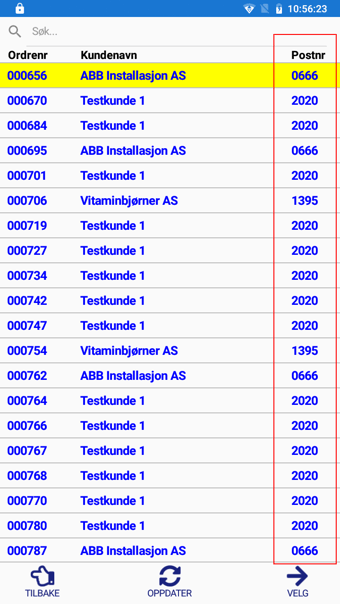
Postnr eksisterer fra før i ordrehode-spørringen - delpostcode.
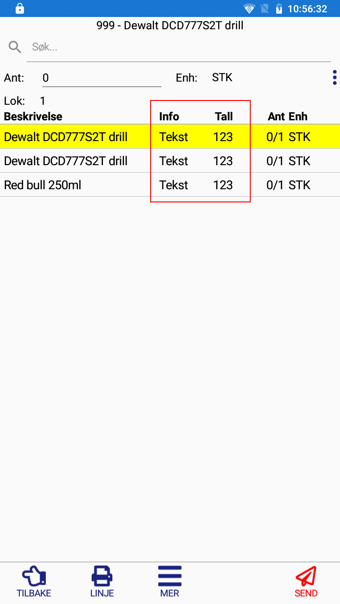
Info og Tall feltene er lagt til i ordrelinje-spørringen som information og numberinformation. I dette tilfellet er informasjonen hardkodet direkte i spørringen, til faktisk bruk henter man bare ut ønsket felt som da henter ønsket data.


#### 3. BxMobile
Når alt er konfigurert opp korrekt i BxAdmin og [innstillinger](https://kb.bxsoftware.no/hjelp/hvordan-laste-ned-nye-innstillinger-til-bxmobile?hsLang=en) + [data](https://kb.bxsoftware.no/hjelp/motta-data?hsLang=en) (avhengig av hvilken modul dette er satt opp for) er hentet til BxMobile skal kolonnene til slutt se ca. slik ut.
- [BxLogistics Installation](https://kb.bxsoftware.no/en/hjelp/bxlogistics-installation?hsLang=en#main-content)
- [BxEngine and BxSmartPrintPro](https://kb.bxsoftware.no/en/hjelp/bxlogistics-installation?hsLang=en#bxengine-and-bxsmartprintpro)
- [BxLogistics](https://kb.bxsoftware.no/en/hjelp/bxlogistics-installation?hsLang=en#bxlogistics)
- [ERP Integrations and setup](https://kb.bxsoftware.no/en/hjelp/erp-integrations-and-setup?hsLang=en#main-content)
- [Visma Business](https://kb.bxsoftware.no/en/hjelp/erp-integrations-and-setup?hsLang=en#visma-business)
- [VBNxt](https://kb.bxsoftware.no/en/hjelp/erp-integrations-and-setup?hsLang=en#vbnxt)
- [Visma Net](https://kb.bxsoftware.no/en/hjelp/erp-integrations-and-setup?hsLang=en#visma-net)
- [Xledger](https://kb.bxsoftware.no/en/hjelp/erp-integrations-and-setup?hsLang=en#xledger)
- [Transport integrations](https://kb.bxsoftware.no/en/hjelp/transport-integrations?hsLang=en#main-content)
- [AxiaFrakt](https://kb.bxsoftware.no/en/hjelp/transport-integrations?hsLang=en#axiafrakt)
- [Logistra Cargonizer](https://kb.bxsoftware.no/en/hjelp/transport-integrations?hsLang=en#logistra-cargonizer)
- [ERP delivery methods](https://kb.bxsoftware.no/en/hjelp/transport-integrations?hsLang=en#erp-delivery-methods)
- [nShift Shipment Server](https://kb.bxsoftware.no/en/hjelp/transport-integrations?hsLang=en#nshift-shipment-server)
- [nShift/Unifaun Online](https://kb.bxsoftware.no/en/hjelp/transport-integrations?hsLang=en#nshift-unifaun-online)
- [nShift/Consignor OnPrem](https://kb.bxsoftware.no/en/hjelp/transport-integrations?hsLang=en#nshift-consignor-onprem)
- [User guides BxMobile](https://kb.bxsoftware.no/en/hjelp/user-guides-bxmobile?hsLang=en#main-content)
- [General](https://kb.bxsoftware.no/en/hjelp/user-guides-bxmobile?hsLang=en#general)
- [Stock transfer](https://kb.bxsoftware.no/en/hjelp/user-guides-bxmobile?hsLang=en#stock-transfer)
- [Products](https://kb.bxsoftware.no/en/hjelp/user-guides-bxmobile?hsLang=en#products)
- [Picking](https://kb.bxsoftware.no/en/hjelp/user-guides-bxmobile?hsLang=en#picking)
- [Stock count](https://kb.bxsoftware.no/en/hjelp/user-guides-bxmobile?hsLang=en#stock-count)
- [User Guides BxWebManager](https://kb.bxsoftware.no/en/hjelp/user-guides-bxwebmanager?hsLang=en#main-content)
- [General](https://kb.bxsoftware.no/en/hjelp/user-guides-bxwebmanager?hsLang=en#general)
- [Labels](https://kb.bxsoftware.no/en/hjelp/user-guides-bxwebmanager?hsLang=en#labels)
- [Technical Documentation](https://kb.bxsoftware.no/en/hjelp/technical-documentation?hsLang=en#main-content)
- [BxAdmin - Client UI](https://kb.bxsoftware.no/en/hjelp/technical-documentation?hsLang=en#bxadmin-client-ui)
- [BxSmartPrintPro](https://kb.bxsoftware.no/en/hjelp/technical-documentation?hsLang=en#bxsmartprintpro)
- [Picking - Freight booking](https://kb.bxsoftware.no/en/hjelp/technical-documentation?hsLang=en#picking-freight-booking)
- [Infrastructure](https://kb.bxsoftware.no/en/hjelp/technical-documentation?hsLang=en#infrastructure)
- [Visma Global specific](https://kb.bxsoftware.no/en/hjelp/technical-documentation?hsLang=en#visma-global-specific)
- [Visma Business specific](https://kb.bxsoftware.no/en/hjelp/technical-documentation?hsLang=en#visma-business-specific)
- [VismaNet specific](https://kb.bxsoftware.no/en/hjelp/technical-documentation?hsLang=en#vismanet-specific)
- [Stock count](https://kb.bxsoftware.no/en/hjelp/stock-count?hsLang=en#main-content)
- [Visma Net](https://kb.bxsoftware.no/en/hjelp/stock-count?hsLang=en#visma-net)
- [Logistics](https://kb.bxsoftware.no/en/hjelp/logistics?hsLang=en#main-content)
- [Location](https://kb.bxsoftware.no/en/hjelp/logistics?hsLang=en#location)
- [Troubleshooting](https://kb.bxsoftware.no/en/hjelp/troubleshooting?hsLang=en#main-content)
- [Freight](https://kb.bxsoftware.no/en/hjelp/troubleshooting?hsLang=en#freight)
- [Visma Net](https://kb.bxsoftware.no/en/hjelp/troubleshooting?hsLang=en#visma-net)
- [BxMobile](https://kb.bxsoftware.no/en/hjelp/troubleshooting?hsLang=en#bxmobile)
- [BxSmartPrintPro](https://kb.bxsoftware.no/en/hjelp/troubleshooting?hsLang=en#bxsmartprintpro)
- [Visma Business](https://kb.bxsoftware.no/en/hjelp/troubleshooting?hsLang=en#visma-business)
- [BxAdmin](https://kb.bxsoftware.no/en/hjelp/troubleshooting?hsLang=en#bxadmin)
- [BxAPI](https://kb.bxsoftware.no/en/hjelp/bxapi?hsLang=en)
- [Video archive](https://kb.bxsoftware.no/en/hjelp/video-archive?hsLang=en#main-content)
- [Sales](https://kb.bxsoftware.no/en/hjelp/video-archive?hsLang=en#sales)
- [Stock pick](https://kb.bxsoftware.no/en/hjelp/video-archive?hsLang=en#stock-pick)
- [Stock count](https://kb.bxsoftware.no/en/hjelp/video-archive?hsLang=en#stock-count)
- [General](https://kb.bxsoftware.no/en/hjelp/video-archive?hsLang=en#general)
- [BxWebManager](https://kb.bxsoftware.no/en/hjelp/video-archive?hsLang=en#bxwebmanager)
[](https://www.bxlogistics.no/)
Karihaugveien 89, Oslo, Norway
[mailto:support@bxsoftware.no](mailto:support@bxsoftware.no)
Copyright © 2025, BxSoftware AS